- Welcome to Zoo Tycoon Designer Guild.
Zoo Tycoon Designer Guild
Downloads plus information for ZT1 designers or ZT1 players
Recent posts
#11
DLLs and Utilities and Designer Resources / Re: Zoo Object List Programs a...
Last post by Jay - December 12, 2025, 09:52:13 PMThe ZT Spreadsheet Subset file inside ZTlistSm.zip in the first post has been updated to include everything I have as of December 1, 2025. That ZTlistSm.csv file is currently dated December 11, 2025. That file is useful for the Zoo Object List program to show which ztd, zip, and rar files contain the downloads used in a zoo.
Note to designers: As a reminder, all versions of APE and APExp can choose APE IDs that were previously used. The ZT Spreadsheet Subset file is useful for designers to see if an APE ID, internal name, ".ztd" name, ".zip" name, ".wav" name, ".cfg" name, ".scn" name, ".lyt" name, or "unlock" name has been used before. Whenever I create something new, I always check that file to make sure those various names and APE ID have not been used before.
Note to designers: As a reminder, all versions of APE and APExp can choose APE IDs that were previously used. The ZT Spreadsheet Subset file is useful for designers to see if an APE ID, internal name, ".ztd" name, ".zip" name, ".wav" name, ".cfg" name, ".scn" name, ".lyt" name, or "unlock" name has been used before. Whenever I create something new, I always check that file to make sure those various names and APE ID have not been used before.
#12
Fences and Walls and Zoo Entrances / $1 Decorative Picket Utility F...
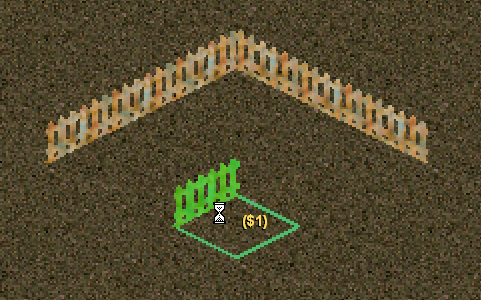
Last post by Jay - October 28, 2025, 11:07:23 PM$1 Decorative Picket Utility Fence
Author: Cricket
Keywords: decorative fence, utility file
Release date: October 8, 2021
Current ztd date: October 7, 2021
Zip size: 22.7 KB
Compatibility: All Game Versions
Description: Using this utility fence is an easy way to make sure you build the exhibit the size that you intended. Each fence section has a purchase price of $1. If you want one side of your exhibit to be 11 game tiles long, drop and drag this fence until the price shows $11. Do this for all remaining sides of your exhibit. This is a decorative fence so it is used as a template only. You will then need to replace all sections with either the invisible fence or any other suitable exhibit fence.
This fence is also useful to measure distances, especially for buildings that transport guests a specific number of tiles.
Since multiple fences use the same Decorative Wall messages, if you select one in the purchase menu, there are times when the selection will go to the first one in the menu: when the menu is closed and reopened, when the menu is switched to a different one and then back to the fences, when ZT goes through its unlocking logic that occurs at the beginning of some game months. We live with this in order not to use up IDs too quickly.
NOTE: The file at this site is a backup. Cricket gave permission for that. Before downloading from here, you should check the link at the end of this post to see if that is newer.
Click here to download FencePicketOneDollarUtility_clh.zip
-----
The main location for this download is at the following Zoo Tek Phoenix link, which is where it would be updated before anywhere else:
https://zootekphoenix.com/forums/files/file/5494-1-decorative-picket-utility-fence-by-cricket/
Author: Cricket
Keywords: decorative fence, utility file
Release date: October 8, 2021
Current ztd date: October 7, 2021
Zip size: 22.7 KB
Compatibility: All Game Versions
Description: Using this utility fence is an easy way to make sure you build the exhibit the size that you intended. Each fence section has a purchase price of $1. If you want one side of your exhibit to be 11 game tiles long, drop and drag this fence until the price shows $11. Do this for all remaining sides of your exhibit. This is a decorative fence so it is used as a template only. You will then need to replace all sections with either the invisible fence or any other suitable exhibit fence.
This fence is also useful to measure distances, especially for buildings that transport guests a specific number of tiles.
Since multiple fences use the same Decorative Wall messages, if you select one in the purchase menu, there are times when the selection will go to the first one in the menu: when the menu is closed and reopened, when the menu is switched to a different one and then back to the fences, when ZT goes through its unlocking logic that occurs at the beginning of some game months. We live with this in order not to use up IDs too quickly.
NOTE: The file at this site is a backup. Cricket gave permission for that. Before downloading from here, you should check the link at the end of this post to see if that is newer.
Click here to download FencePicketOneDollarUtility_clh.zip
-----
The main location for this download is at the following Zoo Tek Phoenix link, which is where it would be updated before anywhere else:
https://zootekphoenix.com/forums/files/file/5494-1-decorative-picket-utility-fence-by-cricket/
#13
Paths / LOTR Isengard Paths
Last post by Jay - October 12, 2025, 11:15:34 PMLOTR Isengard Paths

Author: Jay
Keywords: LOTR Isengard path
Release date: October 12, 2025
Current ztd date: October 12, 2025
Zip size: 38.8 KB
Compatibility: All Game Versions
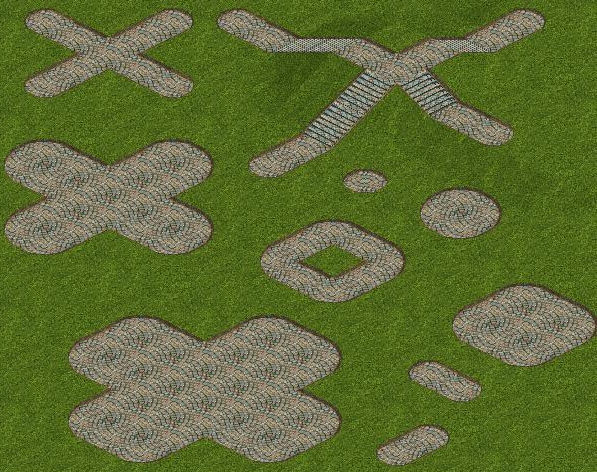
Description: The ztd has 2 paths: LOTR Isengard Path With Curved Ends and LOTR Isengard Path With Straight Ends, as shown in the screenshots. They are both made from a texture used by MidwestBoyInLA for RCT2. He used the name "LOTR Isengard Footpath", so I used a similar name, although these are slightly different than his.
Click here to download LOTRIsengardPathsByJay.zip
Author: Jay
Keywords: LOTR Isengard path
Release date: October 12, 2025
Current ztd date: October 12, 2025
Zip size: 38.8 KB
Compatibility: All Game Versions
Description: The ztd has 2 paths: LOTR Isengard Path With Curved Ends and LOTR Isengard Path With Straight Ends, as shown in the screenshots. They are both made from a texture used by MidwestBoyInLA for RCT2. He used the name "LOTR Isengard Footpath", so I used a similar name, although these are slightly different than his.
Click here to download LOTRIsengardPathsByJay.zip
#14
Fences and Walls and Zoo Entrances / Brick And Spear Fence
Last post by Jay - October 10, 2025, 04:57:26 AMBrick And Spear Fence
Author: Jay
Keywords: decorative brick spear fence
Release date: October 10, 2025
Current ztd date: October 9, 2025
Zip size: 19.9 KB
Compatibility: All Game Versions
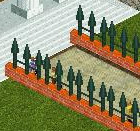
Description: This is a decorative brick and spear fence. It is inspired by a fence used at Disneyland's Haunted Mansion, but this is exaggerated to be seen more easily in ZT. This fence uses the Decorative Fence messages that are already in LANG--ZTCDD.dll.
Since multiple fences use the same Decorative Fence messages, if you select one in the purchase menu, there are times when the selection will go to the first one in the menu: when the menu is closed and reopened, when the menu is switched to a different one and then back to the fences, when ZT goes through its unlocking logic that occurs at the beginning of some game months. We live with this in order not to use up IDs too quickly.
Click here to download BrickAndSpearFenceByJay.zip
Author: Jay
Keywords: decorative brick spear fence
Release date: October 10, 2025
Current ztd date: October 9, 2025
Zip size: 19.9 KB
Compatibility: All Game Versions
Description: This is a decorative brick and spear fence. It is inspired by a fence used at Disneyland's Haunted Mansion, but this is exaggerated to be seen more easily in ZT. This fence uses the Decorative Fence messages that are already in LANG--ZTCDD.dll.
Since multiple fences use the same Decorative Fence messages, if you select one in the purchase menu, there are times when the selection will go to the first one in the menu: when the menu is closed and reopened, when the menu is switched to a different one and then back to the fences, when ZT goes through its unlocking logic that occurs at the beginning of some game months. We live with this in order not to use up IDs too quickly.
Click here to download BrickAndSpearFenceByJay.zip
#15
Buildings and Shelters and Toys / Haunted Mansion Ride
Last post by Jay - October 07, 2025, 03:48:44 AMHaunted Mansion Ride
Author: Jay
Keywords: haunted mansion ride
Release date: October 7, 2025
Current ztd date: October 6, 2025
Zip size: 3.04 MB
Compatibility: All Game Versions
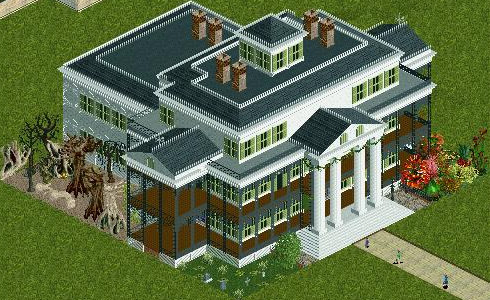
Description: When guests take a ride in this haunted mansion, they will be amazed and entertained by the grinning ghosts, spectral surprises, playful apparitions, and other spirited residents of this happy haunt. It is inspired by Disney's Haunted Mansions. The building itself represents the Haunted Mansion at Disneyland in California. A number of years ago, a number of designers in the RCT2 user community created a lot of Disneyland objects. That included objects for a Disney Haunted Mansion ride. They also used lots of tiny pieces to create the exterior of the building itself, as seen in the screenshot. So I do not take credit for that. I did not create it myself because they did a fantastic job at reproducing the actual Disneyland Haunted Mansion building. Here is a picture in Wikipedia of the actual building:
https://commons.wikimedia.org/wiki/File:Haunted_Mansion_July_4.jpg
I did the layout of things around the building from lots of things made for RCT2. When guests use this building in ZT, most of the top of the building will disappear so that the inside of it can be seen. The entire layout inside the building was made by me from lots of things made for RCT2. Some of those things are based on Disney's Haunted Mansion rides; some are based on other Disney rides, some are based on Harry Potter and Lord Of The Rings; the rest are other things that fit into a haunted mansion theme. The default price for guests to use the building is 13, since the "ghostfather clock" at Disney's Haunted Mansions strikes 13. Like Disney's Haunted Mansions, this is meant to be a playful haunt rather than a scary haunt. The layouts around and inside the Haunted Mansion were made by me using a lot of graphics made by The Amazing Earl, MidwestBoyInLA, Fisherman, Mama Bear, ToonTowner, Makonix/mkx/argonath, MKY, MKG, cjk, GW, Magnus/MG, hawk, Kahlua17, pierreluch, tom25489, Kumba, and others for RCT2, as well as some other graphics from RCT2. The sound is a combination of 2 sounds from Disney's Haunted Mansion: a snippet of the greeting and a snippet of the song Grim Grinning Ghosts.
(Configuration note: removes money.)
The haunted mansion messages are in LANG--ZTCDD.dll dated October 6, 2025 or newer, which can be downloaded at ZTCDD:
http://www.ztcdd.org/DD/index.php?topic=7315.0
Disneyland's Haunted Mansion has a special meaning to me. It was created when I was a boy. It was made before portable computers and cell phones existed. Computers back then had to be in their own air conditioned computer rooms. Those computers were expensive. So companies used computers for payroll, financial, and scheduling purposes. But Disney used a minicomputer in one of those air conditioned computer rooms to control everything in the Haunted Mansion. That showed me that computers can be used to bring enjoyment to others. So it inspired me to become a computer software engineer, making programs that control machines. As it turned out, I did this work for manufacturing companies rather than for entertainment companies. But that desire to use computers to try to bring enjoyment to others is what eventually led me to helping in the ZT user community.
Click here to download HauntedMansionRideByJay.zip
Author: Jay
Keywords: haunted mansion ride
Release date: October 7, 2025
Current ztd date: October 6, 2025
Zip size: 3.04 MB
Compatibility: All Game Versions
Description: When guests take a ride in this haunted mansion, they will be amazed and entertained by the grinning ghosts, spectral surprises, playful apparitions, and other spirited residents of this happy haunt. It is inspired by Disney's Haunted Mansions. The building itself represents the Haunted Mansion at Disneyland in California. A number of years ago, a number of designers in the RCT2 user community created a lot of Disneyland objects. That included objects for a Disney Haunted Mansion ride. They also used lots of tiny pieces to create the exterior of the building itself, as seen in the screenshot. So I do not take credit for that. I did not create it myself because they did a fantastic job at reproducing the actual Disneyland Haunted Mansion building. Here is a picture in Wikipedia of the actual building:
https://commons.wikimedia.org/wiki/File:Haunted_Mansion_July_4.jpg
I did the layout of things around the building from lots of things made for RCT2. When guests use this building in ZT, most of the top of the building will disappear so that the inside of it can be seen. The entire layout inside the building was made by me from lots of things made for RCT2. Some of those things are based on Disney's Haunted Mansion rides; some are based on other Disney rides, some are based on Harry Potter and Lord Of The Rings; the rest are other things that fit into a haunted mansion theme. The default price for guests to use the building is 13, since the "ghostfather clock" at Disney's Haunted Mansions strikes 13. Like Disney's Haunted Mansions, this is meant to be a playful haunt rather than a scary haunt. The layouts around and inside the Haunted Mansion were made by me using a lot of graphics made by The Amazing Earl, MidwestBoyInLA, Fisherman, Mama Bear, ToonTowner, Makonix/mkx/argonath, MKY, MKG, cjk, GW, Magnus/MG, hawk, Kahlua17, pierreluch, tom25489, Kumba, and others for RCT2, as well as some other graphics from RCT2. The sound is a combination of 2 sounds from Disney's Haunted Mansion: a snippet of the greeting and a snippet of the song Grim Grinning Ghosts.
(Configuration note: removes money.)
The haunted mansion messages are in LANG--ZTCDD.dll dated October 6, 2025 or newer, which can be downloaded at ZTCDD:
http://www.ztcdd.org/DD/index.php?topic=7315.0
Disneyland's Haunted Mansion has a special meaning to me. It was created when I was a boy. It was made before portable computers and cell phones existed. Computers back then had to be in their own air conditioned computer rooms. Those computers were expensive. So companies used computers for payroll, financial, and scheduling purposes. But Disney used a minicomputer in one of those air conditioned computer rooms to control everything in the Haunted Mansion. That showed me that computers can be used to bring enjoyment to others. So it inspired me to become a computer software engineer, making programs that control machines. As it turned out, I did this work for manufacturing companies rather than for entertainment companies. But that desire to use computers to try to bring enjoyment to others is what eventually led me to helping in the ZT user community.
Click here to download HauntedMansionRideByJay.zip
#16
Buildings and Shelters and Toys / Celestial Buildings
Last post by fern - October 06, 2025, 01:24:07 AMCelestial Buildings
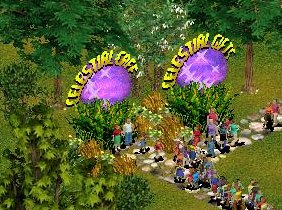
Author: Dr Rick
Keywords: restaurant, giftshop, alien
Date Released: 6 October 2025
Current ztds dated 21 September 2025
File Size: 212 kb
Compatibility: All Game Versions
Description: Started from a request back in 2008 as a request by ZZ. Delayed over the years for various reasons it is finally being released.
Graphics: Dr Rick, item icons: Genki, configuring: fern
Message ids in LANG--fern-Tek.dll
Click here to download Celestial Buildings
Author: Dr Rick
Keywords: restaurant, giftshop, alien
Date Released: 6 October 2025
Current ztds dated 21 September 2025
File Size: 212 kb
Compatibility: All Game Versions
Description: Started from a request back in 2008 as a request by ZZ. Delayed over the years for various reasons it is finally being released.
Graphics: Dr Rick, item icons: Genki, configuring: fern
Message ids in LANG--fern-Tek.dll
Click here to download Celestial Buildings
#17
DLLs and Utilities and Designer Resources / Re: LANG Fern Tek dll File
Last post by fern - September 28, 2025, 05:06:29 AMUpdated: September 20, 2025 to adjust messages of the Celestial and Sand Castle buildings
#18
Buildings and Shelters and Toys / Elevators
Last post by Jay - September 19, 2025, 11:20:16 PMElevators

Author: Jay
Keywords: elevator
Release date: September 19, 2025
Current ztd dates: September 17, 2025 for both
Zip sizes:
ElevatorByJay.zip - 16.2 KB
DownElevatorByJay.zip - 24.3 KB
Compatibility: All Game Versions
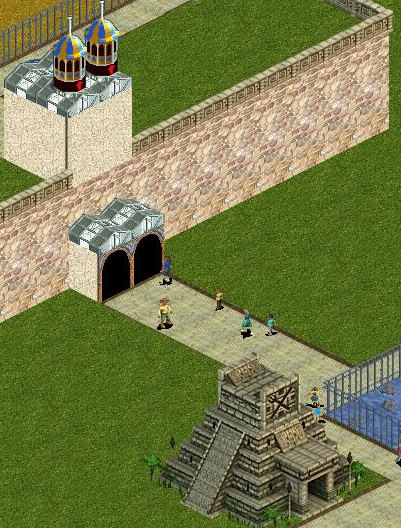
Description: These are elevators to allow guests to get onto and off of a cliff. They can be used together like the first screenshot shows, or they can be used with other things. Both are called Elevator in the purchase menu. The shorter building is meant to get guests up onto a cliff and is the building at the bottom of the cliff in the first screenshot. The taller building is meant to get guests down from a cliff. The back of that building is shown on the cliff in the first screenshot and the front of that building is shown in the second screenshot. Their purchase menu icons show "4" in green on the left side of the icon, which means that the guests will exit 4 tiles away from where they entered. Another way of looking at that is there must be exactly 3 tiles between the entrance tiles and the exit tiles. If that cliff was lowered to ground level, the 2 buildings would be back to back. Usually ZT will not have guests use the same type of entrance more than once. Since an Elevator for fun was used to get guests onto the cliff, ZT usually will not have guests use another Elevator for fun to get off the cliff. So in addition for fun, the Elevator on the cliff is also configured to have guests enter it when they get hungry. So there should be a restaurant near the Elevator on the ground. To indicate the Elevator on the cliff is to be used when guests get hungry, the front of that Elevator looks different, as is shown in the second screenshot. In this example, the cliff has an exhibit, gift cart, restroom, and a couple of benches. So guests can stay happy on the cliff until they get hungry and leave the cliff via the Elevator. There should not be food or drink on the cliff, so that the guests will eventually get hungry and use the Elevator to leave. A zookeeper should be assigned specifically to the exhibit so that they don't wander far. Otherwise ZT can have them leave the cliff, but not be able to get them back up. If the exhibit fences deteriorate, maintenance workers might have to be grabbed and put on the cliff manually. These elevators were made by Jay using some graphics from RCT2, and the down elevator also includes a graphic made by Makonix/argonath for RCT2.
Since the elevators use the same messages, if you select one in the purchase menu, there are times when the selection will go to the first one in the menu: when the menu is rotated, when the menu is closed and reopened, when the menu is switched to a different one and then back, when ZT goes through its unlocking logic that occurs at the beginning of some game months. We live with this in order not to use up IDs too quickly.
The elevator messages are in LANG--fern-Tek.dll.
Click here to download ElevatorByJay.zip
Click here to download DownElevatorByJay.zip
Author: Jay
Keywords: elevator
Release date: September 19, 2025
Current ztd dates: September 17, 2025 for both
Zip sizes:
ElevatorByJay.zip - 16.2 KB
DownElevatorByJay.zip - 24.3 KB
Compatibility: All Game Versions
Description: These are elevators to allow guests to get onto and off of a cliff. They can be used together like the first screenshot shows, or they can be used with other things. Both are called Elevator in the purchase menu. The shorter building is meant to get guests up onto a cliff and is the building at the bottom of the cliff in the first screenshot. The taller building is meant to get guests down from a cliff. The back of that building is shown on the cliff in the first screenshot and the front of that building is shown in the second screenshot. Their purchase menu icons show "4" in green on the left side of the icon, which means that the guests will exit 4 tiles away from where they entered. Another way of looking at that is there must be exactly 3 tiles between the entrance tiles and the exit tiles. If that cliff was lowered to ground level, the 2 buildings would be back to back. Usually ZT will not have guests use the same type of entrance more than once. Since an Elevator for fun was used to get guests onto the cliff, ZT usually will not have guests use another Elevator for fun to get off the cliff. So in addition for fun, the Elevator on the cliff is also configured to have guests enter it when they get hungry. So there should be a restaurant near the Elevator on the ground. To indicate the Elevator on the cliff is to be used when guests get hungry, the front of that Elevator looks different, as is shown in the second screenshot. In this example, the cliff has an exhibit, gift cart, restroom, and a couple of benches. So guests can stay happy on the cliff until they get hungry and leave the cliff via the Elevator. There should not be food or drink on the cliff, so that the guests will eventually get hungry and use the Elevator to leave. A zookeeper should be assigned specifically to the exhibit so that they don't wander far. Otherwise ZT can have them leave the cliff, but not be able to get them back up. If the exhibit fences deteriorate, maintenance workers might have to be grabbed and put on the cliff manually. These elevators were made by Jay using some graphics from RCT2, and the down elevator also includes a graphic made by Makonix/argonath for RCT2.
Since the elevators use the same messages, if you select one in the purchase menu, there are times when the selection will go to the first one in the menu: when the menu is rotated, when the menu is closed and reopened, when the menu is switched to a different one and then back, when ZT goes through its unlocking logic that occurs at the beginning of some game months. We live with this in order not to use up IDs too quickly.
The elevator messages are in LANG--fern-Tek.dll.
Click here to download ElevatorByJay.zip
Click here to download DownElevatorByJay.zip
#19
Buildings and Shelters and Toys / Mover Entrances
Last post by Jay - September 19, 2025, 07:42:53 AMMover Entrances
Author: Jay
Keywords: mover ride entrance
Release date: September 19, 2025
Current ztd dates: September 13, 2025 for both
Zip sizes:
ElevatedMoverEntranceByJay.zip - 37.3 KB
MoverEntranceByJay.zip - 49.4 KB
Compatibility: All Game Versions
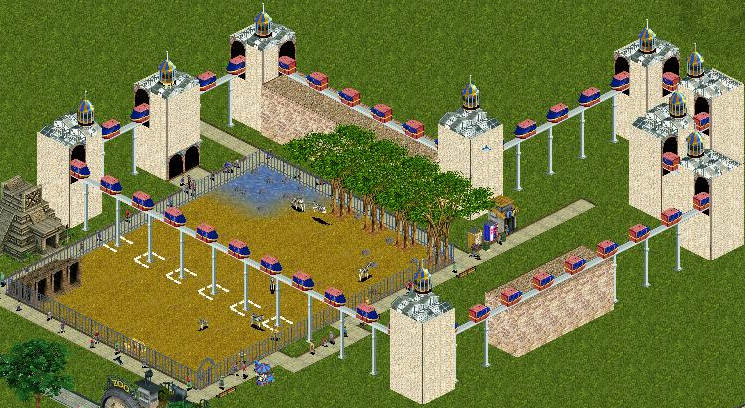
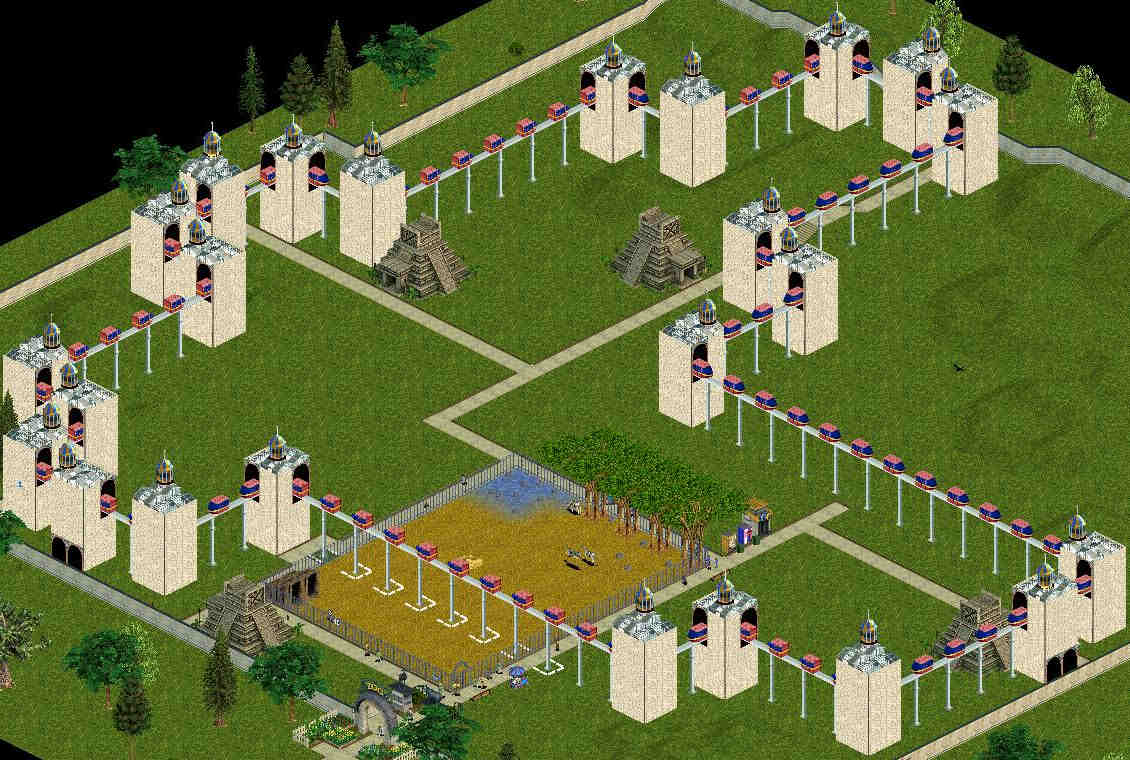
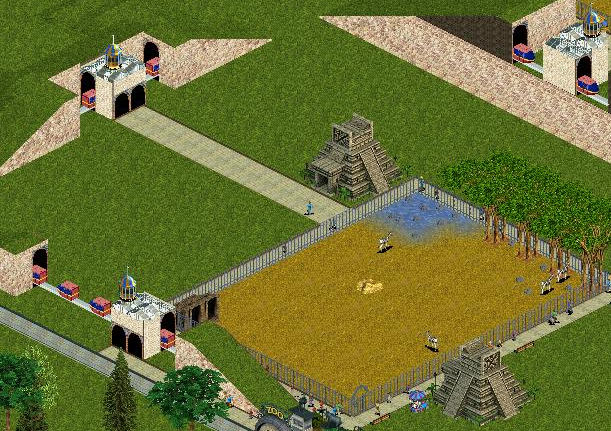
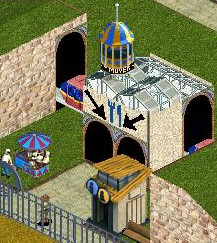
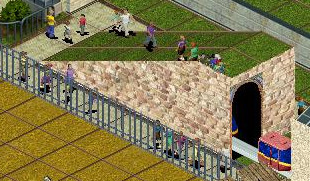
Description: These are entrances to people mover types of rides. They can be put with certain types of people mover scenery to make it appear guests are using the people movers. Although they can be used with other types of people movers as well, the screenshots show them being used with the Elevated Monorail People Mover and Monorail People Mover On Ground scenery pieces. The layouts in the screenshots are examples, and many other layouts are possible. There are 6 mover entrances: 3 for elevated people movers and 3 for people movers on the ground. All 6 mover entrances have 2 entrances at ground level on the same side of the building. The first 3 screenshots show the 3 mover entrances for elevated people movers. The entrance in the first screenshot is configured as a Relaxing Ride where guests enter, use the people mover for 125 seconds, and exit where they entered. The purchase menu icon shows "125" in black on the right side. The second screenshot has 4 entrances that are configured as a Transportation Station, and have "55" and "125" on the purchase menu icon. The "125" in black on the right side of the icon indicates that guests will use the people mover for 125 seconds. The "55" in green on the left side of the icon means that the guests will exit 55 tiles away from where they entered. Another way of looking at that is there must be exactly 54 tiles between the entrance tiles and the exit tiles. A useful way to measure 54 tiles is to use Cricket's One Dollar Picket Fence. The entrance tiles have to be next to the entrances on the entrance building, and the entrance building should be between the entrance tiles and exit tiles in order to have the correct distance. The distance is about the distance to get across the length or across the width of ZT's "Basic Grass Map (Small)". In that second screenshot, guests can enter the building on the left side and exit on the other side of the center building in the top right. Guests can also enter that center building in the top right and exit at the building on the left side. Guests can also enter the building in the bottom right and exit the other side of the center building in the top left. Guests can also enter that center building in the top left and exit at the building in the bottom right. The third screenshot shows an entrance that is configured as a Transportation Station, and has "213" and "125" on its purchase menu icon. The "125" in black on the right side of the icon indicates that guests will use the people mover for 125 seconds. The "213" in green on the left side of the icon means that the guests will exit 213 tiles away from where they entered. Another way of looking at that is there must be exactly 212 tiles between the entrance tiles and the exit tiles. That distance is to get across the largest user made map, which is called enlarged5c.zoo. Because of how large that map is, the screenshot shows only a small part of the layout. It is best not to have so much empty space in the zoo like is shown in the screenshot because guests can become so hungry trying to get to a mover entrance elsewhere on the map that they will become unhappy for not seeing animals and decide to leave the zoo instead. When using any of these people mover entrances, guests can get hungry while being there for 125 seconds. So restaurants should be near all of the exits. The fourth screenshot has all 3 of the ground level mover entrances, each configured differently. The entrance at the top left is configured as a Relaxing Ride where guests enter, use the people mover for 125 seconds, and exit where they entered. The purchase menu icon shows "125" in black on the right side. The entrance at the bottom left is configured as a Transportation Station, and has "30" and "70" on its purchase menu icon. The "70" in black on the right side of the icon indicates that guests will use the people mover for 70 seconds. The "30" in green on the left side of the icon means that the guests will exit 30 tiles away from where they entered. Another way of looking at that is there must be exactly 29 tiles between the entrance tiles and the exit tiles. Guests can enter the building on the bottom left and exit on the other side of the building in the top right, which happens to be on a cliff in this layout. The building in the top right is configured as a Transportation Station, and has "30" and "70" on its purchase menu icon. Beneath the "70" is a down arrow in red. That means the station is meant to be on cliffs. Usually ZT will not have guests use the same type of entrance more than once. Since a Transportation Station for fun was used to get guests onto the cliff, ZT usually will not have guests use another Transportation Station for fun to get off the cliff. So in addition for fun, the Transportation Station on the cliff is also configured to have guests enter it when they get hungry. So there should be a restaurant near the Transportation Station on the ground. To indicate the Station on the cliff is to be used when guests get hungry, the front of the Station looks different, as is shown in the fifth screenshot. In this example, the cliff has an exhibit, gift cart, restroom, and a couple of benches. So guests can stay happy on the cliff until they get hungry and leave the cliff via the Station. There should not be food or drink on the cliff, so that the guests will eventually get hungry and use the Station to leave. A zookeeper should be assigned specifically to the exhibit so that they don't wander far. Otherwise ZT can have them leave the cliff, but not be able to get them back up. If the exhibit fences deteriorate, maintenance workers might have to be grabbed and put on the cliff manually. Although other layouts can be used, the layout in the fourth screenshot makes it look like the monorail people mover goes underground by using slopes. But this layout is not perfect because of a ZT graphics glitch. The sixth screenshot shows the glitch. In 1 ZT view, ZT makes it look like guests are on the slope, even though the guests are actually on the other side of the slope. There are different ways to prevent or hide the guests in this view, such as keeping the path far from the slope, or having tall walls or objects on top of the slope. The graphical glitch has nothing to do with the user made objects. These mover entrances were made by Jay using a graphic made by Makonix/argonath for RCT2, as well as some other graphics from RCT2.
Since the entrances use the same messages, if you select one in the purchase menu, there are times when the selection will go to the first one in the menu: when the menu is rotated, when the menu is closed and reopened, when the menu is switched to a different one and then back, when ZT goes through its unlocking logic that occurs at the beginning of some game months. We live with this in order not to use up IDs too quickly.
The building messages are in LANG--ZTCDD.dll and the guest thought message for the elevated mover entrances is in langZA03.dll.
(Configuration note: removes money.)
Click here to download ElevatedMoverEntranceByJay.zip
Click here to download MoverEntranceByJay.zip
Author: Jay
Keywords: mover ride entrance
Release date: September 19, 2025
Current ztd dates: September 13, 2025 for both
Zip sizes:
ElevatedMoverEntranceByJay.zip - 37.3 KB
MoverEntranceByJay.zip - 49.4 KB
Compatibility: All Game Versions
Description: These are entrances to people mover types of rides. They can be put with certain types of people mover scenery to make it appear guests are using the people movers. Although they can be used with other types of people movers as well, the screenshots show them being used with the Elevated Monorail People Mover and Monorail People Mover On Ground scenery pieces. The layouts in the screenshots are examples, and many other layouts are possible. There are 6 mover entrances: 3 for elevated people movers and 3 for people movers on the ground. All 6 mover entrances have 2 entrances at ground level on the same side of the building. The first 3 screenshots show the 3 mover entrances for elevated people movers. The entrance in the first screenshot is configured as a Relaxing Ride where guests enter, use the people mover for 125 seconds, and exit where they entered. The purchase menu icon shows "125" in black on the right side. The second screenshot has 4 entrances that are configured as a Transportation Station, and have "55" and "125" on the purchase menu icon. The "125" in black on the right side of the icon indicates that guests will use the people mover for 125 seconds. The "55" in green on the left side of the icon means that the guests will exit 55 tiles away from where they entered. Another way of looking at that is there must be exactly 54 tiles between the entrance tiles and the exit tiles. A useful way to measure 54 tiles is to use Cricket's One Dollar Picket Fence. The entrance tiles have to be next to the entrances on the entrance building, and the entrance building should be between the entrance tiles and exit tiles in order to have the correct distance. The distance is about the distance to get across the length or across the width of ZT's "Basic Grass Map (Small)". In that second screenshot, guests can enter the building on the left side and exit on the other side of the center building in the top right. Guests can also enter that center building in the top right and exit at the building on the left side. Guests can also enter the building in the bottom right and exit the other side of the center building in the top left. Guests can also enter that center building in the top left and exit at the building in the bottom right. The third screenshot shows an entrance that is configured as a Transportation Station, and has "213" and "125" on its purchase menu icon. The "125" in black on the right side of the icon indicates that guests will use the people mover for 125 seconds. The "213" in green on the left side of the icon means that the guests will exit 213 tiles away from where they entered. Another way of looking at that is there must be exactly 212 tiles between the entrance tiles and the exit tiles. That distance is to get across the largest user made map, which is called enlarged5c.zoo. Because of how large that map is, the screenshot shows only a small part of the layout. It is best not to have so much empty space in the zoo like is shown in the screenshot because guests can become so hungry trying to get to a mover entrance elsewhere on the map that they will become unhappy for not seeing animals and decide to leave the zoo instead. When using any of these people mover entrances, guests can get hungry while being there for 125 seconds. So restaurants should be near all of the exits. The fourth screenshot has all 3 of the ground level mover entrances, each configured differently. The entrance at the top left is configured as a Relaxing Ride where guests enter, use the people mover for 125 seconds, and exit where they entered. The purchase menu icon shows "125" in black on the right side. The entrance at the bottom left is configured as a Transportation Station, and has "30" and "70" on its purchase menu icon. The "70" in black on the right side of the icon indicates that guests will use the people mover for 70 seconds. The "30" in green on the left side of the icon means that the guests will exit 30 tiles away from where they entered. Another way of looking at that is there must be exactly 29 tiles between the entrance tiles and the exit tiles. Guests can enter the building on the bottom left and exit on the other side of the building in the top right, which happens to be on a cliff in this layout. The building in the top right is configured as a Transportation Station, and has "30" and "70" on its purchase menu icon. Beneath the "70" is a down arrow in red. That means the station is meant to be on cliffs. Usually ZT will not have guests use the same type of entrance more than once. Since a Transportation Station for fun was used to get guests onto the cliff, ZT usually will not have guests use another Transportation Station for fun to get off the cliff. So in addition for fun, the Transportation Station on the cliff is also configured to have guests enter it when they get hungry. So there should be a restaurant near the Transportation Station on the ground. To indicate the Station on the cliff is to be used when guests get hungry, the front of the Station looks different, as is shown in the fifth screenshot. In this example, the cliff has an exhibit, gift cart, restroom, and a couple of benches. So guests can stay happy on the cliff until they get hungry and leave the cliff via the Station. There should not be food or drink on the cliff, so that the guests will eventually get hungry and use the Station to leave. A zookeeper should be assigned specifically to the exhibit so that they don't wander far. Otherwise ZT can have them leave the cliff, but not be able to get them back up. If the exhibit fences deteriorate, maintenance workers might have to be grabbed and put on the cliff manually. Although other layouts can be used, the layout in the fourth screenshot makes it look like the monorail people mover goes underground by using slopes. But this layout is not perfect because of a ZT graphics glitch. The sixth screenshot shows the glitch. In 1 ZT view, ZT makes it look like guests are on the slope, even though the guests are actually on the other side of the slope. There are different ways to prevent or hide the guests in this view, such as keeping the path far from the slope, or having tall walls or objects on top of the slope. The graphical glitch has nothing to do with the user made objects. These mover entrances were made by Jay using a graphic made by Makonix/argonath for RCT2, as well as some other graphics from RCT2.
Since the entrances use the same messages, if you select one in the purchase menu, there are times when the selection will go to the first one in the menu: when the menu is rotated, when the menu is closed and reopened, when the menu is switched to a different one and then back, when ZT goes through its unlocking logic that occurs at the beginning of some game months. We live with this in order not to use up IDs too quickly.
The building messages are in LANG--ZTCDD.dll and the guest thought message for the elevated mover entrances is in langZA03.dll.
(Configuration note: removes money.)
Click here to download ElevatedMoverEntranceByJay.zip
Click here to download MoverEntranceByJay.zip
#20
Misc Scenery / Monorail People Movers
Last post by Jay - September 19, 2025, 05:41:01 AMMonorail People Movers
Author: Jay
Keywords: monorail people mover track ride scenery
Release date: September 19, 2025
Current ztd dates: September 13, 2025 for both
Zip sizes:
ElevatedMonorailPeopleMoverByJay.zip - 48.3 KB
MonorailPeopleMoverOnGroundByJay.zip - 47.8 KB
Compatibility: All Game Versions
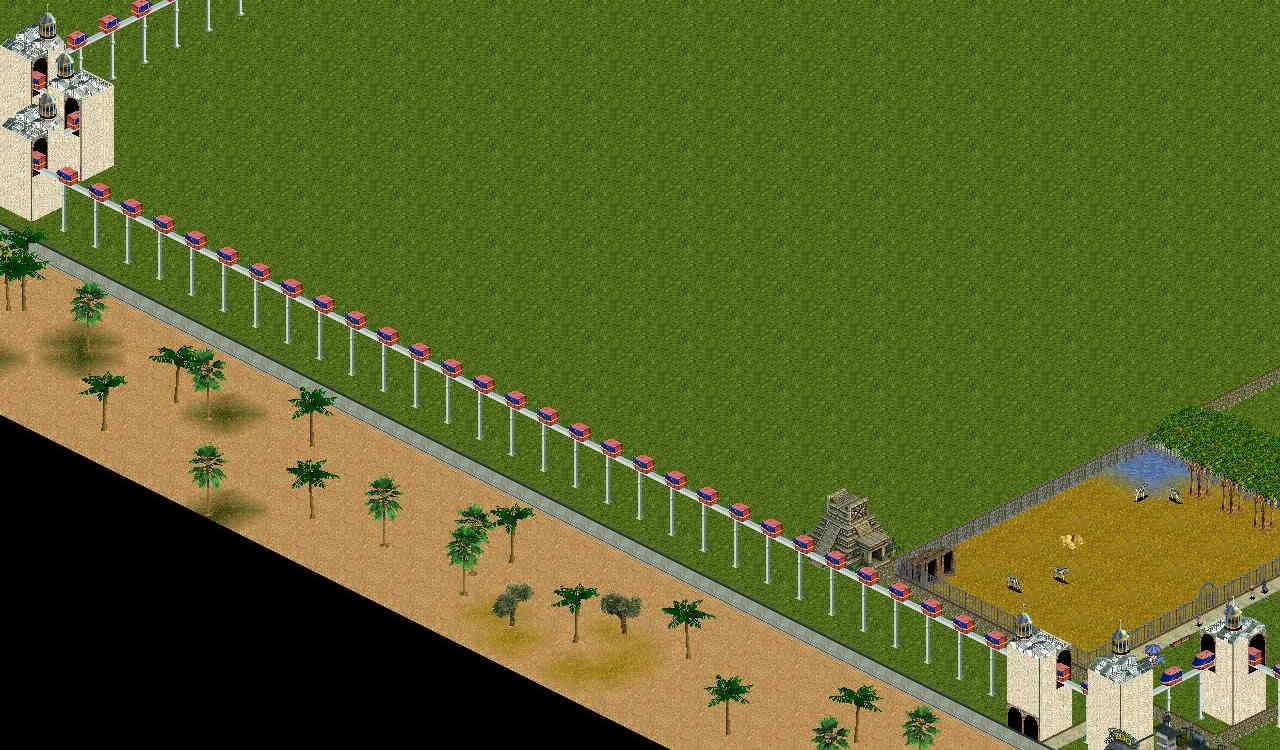
Description: This is scenery that looks like a monorail people mover is moving along a rail. Each piece can be placed next to another to make whatever layout is desired. After pieces are placed in a layout, it is unlikely the animations will blend together. But if the zoo is saved and reloaded, their animations will be in sync. There are 2 versions. One is on an elevated rail; the other is on a rail on the ground. The screenshot shows both types, with the ground version on a cliff that matches the height of the elevated version, although the ground version can be used in other ways as well. The screenshot also shows a number of Elevated Mover Curve pieces to make it look like the monorail people mover is changing directions. Since the monorail people mover pieces are 2 tiles long, it is sometimes difficult to make a complete circuit. Adding more Elevated Mover Curve pieces can help with that. The screenshot also includes an Elevated Mover Entrance to make it look like guests take a ride on the elevated people mover. As the screenshot shows, the elevated people mover can be placed across exhibits and paths, and have animals, guests, and staff walk under the rails. However, to reduce the chance of animals, guests, and staff walking through the posts, the screenshot includes curbs. In the exhibit, the exhibit version of the White Half Curbs were used around 3 of the sides of each post. They cannot be placed completely around each post. For the post that is outside the exhibit but next to the exhibit fence, the path zigzags to get by it. To stop staff and guests from walking through that post, the Grass Curb was used, which blends into the patch of grass. These monorail people movers were made by Jay using some graphics from RCT2.
Click here to download ElevatedMonorailPeopleMoverByJay.zip
Click here to download MonorailPeopleMoverOnGroundByJay.zip
Author: Jay
Keywords: monorail people mover track ride scenery
Release date: September 19, 2025
Current ztd dates: September 13, 2025 for both
Zip sizes:
ElevatedMonorailPeopleMoverByJay.zip - 48.3 KB
MonorailPeopleMoverOnGroundByJay.zip - 47.8 KB
Compatibility: All Game Versions
Description: This is scenery that looks like a monorail people mover is moving along a rail. Each piece can be placed next to another to make whatever layout is desired. After pieces are placed in a layout, it is unlikely the animations will blend together. But if the zoo is saved and reloaded, their animations will be in sync. There are 2 versions. One is on an elevated rail; the other is on a rail on the ground. The screenshot shows both types, with the ground version on a cliff that matches the height of the elevated version, although the ground version can be used in other ways as well. The screenshot also shows a number of Elevated Mover Curve pieces to make it look like the monorail people mover is changing directions. Since the monorail people mover pieces are 2 tiles long, it is sometimes difficult to make a complete circuit. Adding more Elevated Mover Curve pieces can help with that. The screenshot also includes an Elevated Mover Entrance to make it look like guests take a ride on the elevated people mover. As the screenshot shows, the elevated people mover can be placed across exhibits and paths, and have animals, guests, and staff walk under the rails. However, to reduce the chance of animals, guests, and staff walking through the posts, the screenshot includes curbs. In the exhibit, the exhibit version of the White Half Curbs were used around 3 of the sides of each post. They cannot be placed completely around each post. For the post that is outside the exhibit but next to the exhibit fence, the path zigzags to get by it. To stop staff and guests from walking through that post, the Grass Curb was used, which blends into the patch of grass. These monorail people movers were made by Jay using some graphics from RCT2.
Click here to download ElevatedMonorailPeopleMoverByJay.zip
Click here to download MonorailPeopleMoverOnGroundByJay.zip