- Welcome to Zoo Tycoon Designer Guild.
Zoo Tycoon Designer Guild
Downloads plus information for ZT1 designers or ZT1 players
Recent posts
#21
Buildings and Shelters and Toys / Victorian Greenhouse
Last post by fern - August 05, 2025, 09:28:06 AMVictorian Greenhouse

Author: Toodlepops
Keywords: Attraction
Date Released: 6 August 2025
Current tpVictorianGreenhouse.ztd dated 8 March 2025
File Size: 242 KB
Compatibility: All Game Versions
Description: Part of the Victorian Project - a greenhouse for your garden area.
Message ids in langZA03.dll
Note: This has four entrances, one on each side. So be careful not to block them when placing them.
Click here to download Victorian Greenhouse
Author: Toodlepops
Keywords: Attraction
Date Released: 6 August 2025
Current tpVictorianGreenhouse.ztd dated 8 March 2025
File Size: 242 KB
Compatibility: All Game Versions
Description: Part of the Victorian Project - a greenhouse for your garden area.
Message ids in langZA03.dll
Note: This has four entrances, one on each side. So be careful not to block them when placing them.
Click here to download Victorian Greenhouse
#22
Misc Scenery / Aztec Themed Arches
Last post by fern - August 05, 2025, 07:29:12 AMAztec Themed Arches
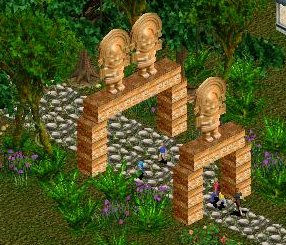
Author: Dr. Rick
Keywords: arches
Date Released: 5 August 2025
Current ztd dates:
- DrRAztecArch.ztd: March 26, 2013
- DrRAztecArchD.ztd: January 6, 2011
File Size: 47 KB
Compatibility: All Game Versions
Description: Two Aztec themed arches for your zoo or park. Part of an uncompleted project.
Click here to download DrRAztecArches.zip
Author: Dr. Rick
Keywords: arches
Date Released: 5 August 2025
Current ztd dates:
- DrRAztecArch.ztd: March 26, 2013
- DrRAztecArchD.ztd: January 6, 2011
File Size: 47 KB
Compatibility: All Game Versions
Description: Two Aztec themed arches for your zoo or park. Part of an uncompleted project.
Click here to download DrRAztecArches.zip
#23
Buildings and Shelters and Toys / Haunted Lighthouse
Last post by fern - July 23, 2025, 07:42:12 AMHaunted Lighthouse
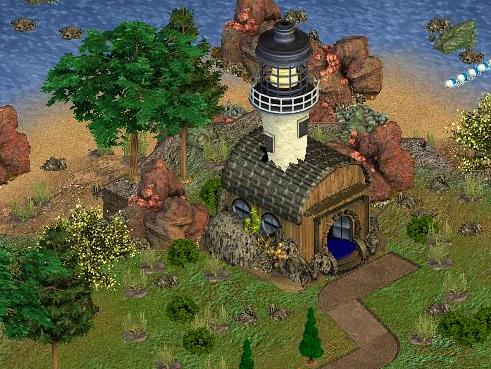
Author: African Raptor and Fern
Keywords: Attraction
Date Released: 24 July 2025
Current HauntedLighthouseByARandFern.ztd dated 24 March 2025
File Size: 80 kb
Compatibility: All Game Versions
Description: Do your guests dare enter the haunted lighthouse.
As requested by pukkie, a working version of AR's scenery haunted lighthouse file.
Graphics by AR, configuring by fern
Click here to download Haunted Lighthouse
Author: African Raptor and Fern
Keywords: Attraction
Date Released: 24 July 2025
Current HauntedLighthouseByARandFern.ztd dated 24 March 2025
File Size: 80 kb
Compatibility: All Game Versions
Description: Do your guests dare enter the haunted lighthouse.
As requested by pukkie, a working version of AR's scenery haunted lighthouse file.
Graphics by AR, configuring by fern
Click here to download Haunted Lighthouse
#24
Fences and Walls and Zoo Entrances / Re: Decorative versions of ZT ...
Last post by fern - July 22, 2025, 06:46:56 AMThree new releases above:
Decorative Low Slat Wall
Decorative Rock Window Wall
Decorative Slat Window Wall
Decorative Low Slat Wall
Decorative Rock Window Wall
Decorative Slat Window Wall
#25
Packs and Themes / Re: Japanese Ponds and Gardens
Last post by fern - July 21, 2025, 03:34:19 AM21 July 2025 Mossy Zen Garden added
#26
Miscellaneous Downloads / Guest Inventory Positions Hack
Last post by Jay - May 12, 2025, 05:35:46 AMGuest Inventory Positions Hack
Author: Jay
Keywords: hack
Release date: May 12, 2025
Most current ztd date: May 12, 2025
Zip size: 675 bytes
Compatibility: All game versions
Description: In ZT, a building's information window includes icons of what the building sells. ZT allows those icons to be 34 pixels wide without them overlapping or touching. A guest's information window includes icons of what the guest bought. But ZT allows less space for those icons. So if the icons are 34 pixels wide, they can overlap. That does not hurt anything, but sometimes does not look good for some icons. This hack allows icons that are 34 pixels wide to be in the guest's information windows without overlapping.
If your main ZT folder already has a hacks or hacks-unused folder, put GuestInventoryPositionsHack.ztd in that folder. Otherwise if your main ZT folder already has a dlupdate folder, put GuestInventoryPositionsHack.ztd in that dlupdate folder. Otherwise put GuestInventoryPositionsHack.ztd in the Updates folder.
This is a hack of ZT's infogst2.lyt file. So it cannot be used at the same time as any other infogst2.lyt hack, such as particleUI_bigger_panels.ztd, particleUI_DreamEmerald_v1.ztd, particleUI_DreamEmerald_v1-PlusMoveablePurchaseMenu.ztd, or particleUI_LostAmethyst_v1.ztd.
Click here to download GuestInventoryPositionsHack.zip
Author: Jay
Keywords: hack
Release date: May 12, 2025
Most current ztd date: May 12, 2025
Zip size: 675 bytes
Compatibility: All game versions
Description: In ZT, a building's information window includes icons of what the building sells. ZT allows those icons to be 34 pixels wide without them overlapping or touching. A guest's information window includes icons of what the guest bought. But ZT allows less space for those icons. So if the icons are 34 pixels wide, they can overlap. That does not hurt anything, but sometimes does not look good for some icons. This hack allows icons that are 34 pixels wide to be in the guest's information windows without overlapping.
If your main ZT folder already has a hacks or hacks-unused folder, put GuestInventoryPositionsHack.ztd in that folder. Otherwise if your main ZT folder already has a dlupdate folder, put GuestInventoryPositionsHack.ztd in that dlupdate folder. Otherwise put GuestInventoryPositionsHack.ztd in the Updates folder.
This is a hack of ZT's infogst2.lyt file. So it cannot be used at the same time as any other infogst2.lyt hack, such as particleUI_bigger_panels.ztd, particleUI_DreamEmerald_v1.ztd, particleUI_DreamEmerald_v1-PlusMoveablePurchaseMenu.ztd, or particleUI_LostAmethyst_v1.ztd.
Click here to download GuestInventoryPositionsHack.zip
#27
Miscellaneous Downloads / No Box Rattling Hack
Last post by fern - November 04, 2024, 03:55:24 AMNo Box Rattling Hack
Author: Fern
Keywords: Hack
Date Released: 5 August 2025
File Size: 1 KB
Compatibility: All Game Versions
Description: This was a requested hack. When animals are in boxes in a zoo, Zoo Tycoon periodically causes the boxes to shake and usually also has the animals make sounds while the shaking occurs. This hack causes Zoo Tycoon to no longer do that shaking and animal sounds from the boxes. This hack is an animals.ai hack. So it cannot be used at the same time as any other animals.ai hack.
Click here to download NoBoxRattlingHackByFern.zip
Author: Fern
Keywords: Hack
Date Released: 5 August 2025
File Size: 1 KB
Compatibility: All Game Versions
Description: This was a requested hack. When animals are in boxes in a zoo, Zoo Tycoon periodically causes the boxes to shake and usually also has the animals make sounds while the shaking occurs. This hack causes Zoo Tycoon to no longer do that shaking and animal sounds from the boxes. This hack is an animals.ai hack. So it cannot be used at the same time as any other animals.ai hack.
Click here to download NoBoxRattlingHackByFern.zip
#28
Water Features / Tankable Waterfall
Last post by fern - March 12, 2023, 08:36:01 PMTankable Waterfall

Author: Fern
Keywords: waterfall
Release date: 13 March 2023
Current ztd date: 13 March 2023
Zip size: 5.94 KB
Compatibility: All Game Versions
Description: This version of the ingame waterfall appears in Rocks, is placeable in any exhibit and also in tanks. For Tanks it is really only suitable for shallow tanks - tank depth of 1 or 2.
Download TankableWaterfall_fn.zip
Author: Fern
Keywords: waterfall
Release date: 13 March 2023
Current ztd date: 13 March 2023
Zip size: 5.94 KB
Compatibility: All Game Versions
Description: This version of the ingame waterfall appears in Rocks, is placeable in any exhibit and also in tanks. For Tanks it is really only suitable for shallow tanks - tank depth of 1 or 2.
Download TankableWaterfall_fn.zip
#29
Packs and Themes / Re: Jungle Sets
Last post by fern - December 10, 2022, 10:50:24 PMCream set released 10 December 2022
#30
Miscellaneous Downloads / No Staff Hack
Last post by Jay - August 27, 2022, 10:38:00 AMNo Staff Hack
Author: Jay
Keywords: hack
Release date: August 27, 2022
Most current ztd date: June 13, 2018
Zip size: 434 bytes
Compatibility: All game versions
Description: This removes all staff (zookeepers, maintenance workers, tour guides, scientists, DRT bases, and marine specialists) from a zoo and no more staff can be hired until NoStaffHack.ztd is removed from ZT's folders. When new staff are hired, their staff numbers will continue from where the numbering left off. Normally NoStaffHack.ztd is used temporarily, such as to save a zoo without any staff or to see if it is staff causing ZT to crash. When NoStaffHack.ztd is used for a version of ZT that includes the DRT Base, the icon for the DRT Base will continue to be in the Hire Staff menu, but a new DRT base cannot be purchased until NoStaffHack.ztd is removed from ZT's folders. If there is a DRT Base in the zoo, the building will continue to be in the zoo, but it will not have a helicopter. If the zoo is saved, then NoStaffHack.ztd is removed from ZT's folders and the zoo is loaded again, any DRT Base in the zoo will still have no helicopter. So the DRT Base building will have to be sold ("fired") and a new DRT Base will have to be put in its place to have a helicopter again.
If your ZT has a dlupdate folder, place NoStaffHack.ztd in ZT's dlupdate folder. Otherwise put NoStaffHack.ztd in ZT's Updates folder. Then remove NoStaffHack.ztd from ZT's folders when it is no longer needed.
This is a hack of ZT's staff.cfg, staff1.cfg, and staff2.cfg files.
Click here to download NoStaffHack.zip
Author: Jay
Keywords: hack
Release date: August 27, 2022
Most current ztd date: June 13, 2018
Zip size: 434 bytes
Compatibility: All game versions
Description: This removes all staff (zookeepers, maintenance workers, tour guides, scientists, DRT bases, and marine specialists) from a zoo and no more staff can be hired until NoStaffHack.ztd is removed from ZT's folders. When new staff are hired, their staff numbers will continue from where the numbering left off. Normally NoStaffHack.ztd is used temporarily, such as to save a zoo without any staff or to see if it is staff causing ZT to crash. When NoStaffHack.ztd is used for a version of ZT that includes the DRT Base, the icon for the DRT Base will continue to be in the Hire Staff menu, but a new DRT base cannot be purchased until NoStaffHack.ztd is removed from ZT's folders. If there is a DRT Base in the zoo, the building will continue to be in the zoo, but it will not have a helicopter. If the zoo is saved, then NoStaffHack.ztd is removed from ZT's folders and the zoo is loaded again, any DRT Base in the zoo will still have no helicopter. So the DRT Base building will have to be sold ("fired") and a new DRT Base will have to be put in its place to have a helicopter again.
If your ZT has a dlupdate folder, place NoStaffHack.ztd in ZT's dlupdate folder. Otherwise put NoStaffHack.ztd in ZT's Updates folder. Then remove NoStaffHack.ztd from ZT's folders when it is no longer needed.
This is a hack of ZT's staff.cfg, staff1.cfg, and staff2.cfg files.
Click here to download NoStaffHack.zip