- Welcome to Zoo Tycoon Designer Guild.
Zoo Tycoon Designer Guild
Downloads plus information for ZT1 designers or ZT1 players
Recent posts
#1
Buildings and Shelters and Toys / Hawaiian Restaurant
Last post by fern - July 10, 2026, 12:06:43 AMHawaiian Restaurant
Author: Devona (original graphics) and Mark Bell (original configuration)
Keywords: restaurant
Original Release Date: February 2, 2002
Updated: In 2009 by casey to fix the graphics so that the entrance is in the correct position in both front views. Updated in 2009, 2019, and 2026 by casey and Jay to have the animation speeds match for all views, to have it also appear in the User Food/Drink purchase menu filter, to have the messages no longer conflict with DD messages, to have a proper restaurant guest thought, to increase the purchase price and use costs to be more in-line with ZT's restaurant, to remove money and any trash a guest may have, to add ZT's restaurant sound, and to remove unnecessary files and configuration lines.
Current ztd date: July 4, 2026
Zip size: 126 KB
Compatibility: All Game Versions
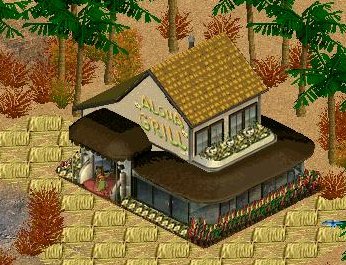
Description: Guests will appreciate being able to enjoy Hawaiian food and watch the hula dancers. Created before the release of the Dinosaur Digs (DD) expansion, the original zip used an exe that overrode the ingame dll and used IDs that Blue Fang used in the DD expansion for fences. With updates from casey and Jay, we are now releasing it back into play. The messages are in langZA03.dll. The purchase menu name is "Hawaiian Restaurant", while the purchase menu tooltip uses the more specific name "Aloha Grill Restaurant". Enjoy.
(Configuration notes: removes money; removes any trash; can also be seen in the User Food/Drink purchase menu filter.)
Click here to download Hawaiian_Restaurant.zip
Author: Devona (original graphics) and Mark Bell (original configuration)
Keywords: restaurant
Original Release Date: February 2, 2002
Updated: In 2009 by casey to fix the graphics so that the entrance is in the correct position in both front views. Updated in 2009, 2019, and 2026 by casey and Jay to have the animation speeds match for all views, to have it also appear in the User Food/Drink purchase menu filter, to have the messages no longer conflict with DD messages, to have a proper restaurant guest thought, to increase the purchase price and use costs to be more in-line with ZT's restaurant, to remove money and any trash a guest may have, to add ZT's restaurant sound, and to remove unnecessary files and configuration lines.
Current ztd date: July 4, 2026
Zip size: 126 KB
Compatibility: All Game Versions
Description: Guests will appreciate being able to enjoy Hawaiian food and watch the hula dancers. Created before the release of the Dinosaur Digs (DD) expansion, the original zip used an exe that overrode the ingame dll and used IDs that Blue Fang used in the DD expansion for fences. With updates from casey and Jay, we are now releasing it back into play. The messages are in langZA03.dll. The purchase menu name is "Hawaiian Restaurant", while the purchase menu tooltip uses the more specific name "Aloha Grill Restaurant". Enjoy.
(Configuration notes: removes money; removes any trash; can also be seen in the User Food/Drink purchase menu filter.)
Click here to download Hawaiian_Restaurant.zip
#2
Buildings and Shelters and Toys / Mauna Loa Cafe
Last post by Jay - July 03, 2026, 06:52:26 AMMauna Loa Cafe
Author: Atlantean Queen
Keywords: Hawaiian volcano restaurant
Release date: July 3, 2026
Current ztd date: July 3, 2026
Zip size: 798 KB
Compatibility: All Game Versions
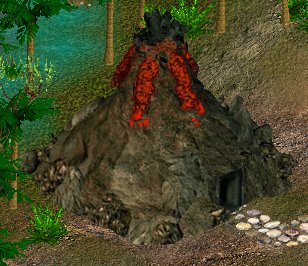
Description: Here is a replica of the Mauna Loa Volcano made into a cafe where your guests can enjoy a fine Hawaiian dining experience. It includes a snippet of the song Volcano, as performed by the group Jimmy And The Parrots (which is a different Jimmy than Jimmy Buffett, who created the song). The messages are in LANG--ZTCDD.dll.
(Configuration notes: removes money; removes any trash; can also be seen in the User Food/Drink purchase menu filter.)
Click here to download MaunaLoaCafe.zip
Author: Atlantean Queen
Keywords: Hawaiian volcano restaurant
Release date: July 3, 2026
Current ztd date: July 3, 2026
Zip size: 798 KB
Compatibility: All Game Versions
Description: Here is a replica of the Mauna Loa Volcano made into a cafe where your guests can enjoy a fine Hawaiian dining experience. It includes a snippet of the song Volcano, as performed by the group Jimmy And The Parrots (which is a different Jimmy than Jimmy Buffett, who created the song). The messages are in LANG--ZTCDD.dll.
(Configuration notes: removes money; removes any trash; can also be seen in the User Food/Drink purchase menu filter.)
Click here to download MaunaLoaCafe.zip
#3
Fences and Walls and Zoo Entrances / Re: Post and Rail Fences
Last post by fern - July 03, 2026, 06:09:57 AMDark Blue Post and Rail released 3 July 2026
#4
Buildings and Shelters and Toys / Mantis Shrimp Restaurant
Last post by Jay - July 03, 2026, 06:03:34 AMMantis Shrimp Restaurant
Author: Dr Rick
Keywords: seafood restaurant
Release date: July 3, 2026
Current ztd date: June 28, 2026
Zip size: 342 KB
Compatibility: All Game Versions
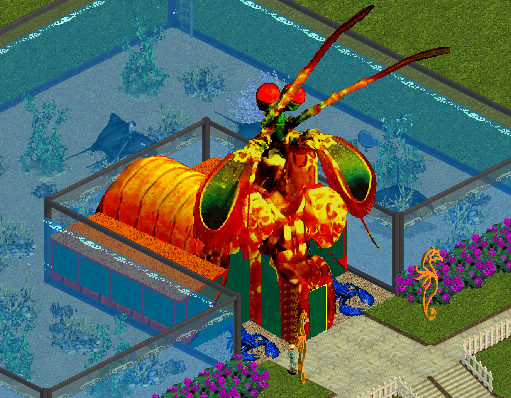
Description: The design of this seafood restaurant was inspired by mantis shrimp. The building's messages are in LANG--ZKL.dll dated June 28, 2026 or newer. The name of the building in ZT is "DeepSea Restaurant", which is also used by other buildings. LANG--Jane.dll, LANG--fern-Tek.dll, and lang--TKZTUFcombin.dll are needed to see the sold item messages. Menu icons by Jane, Brandi, and Rick.
(Configuration notes: removes money; removes any trash; can also be seen in the User Food/Drink purchase menu filter.)
Click here to download DrRMantisShrimpRestaurant.zip
Author: Dr Rick
Keywords: seafood restaurant
Release date: July 3, 2026
Current ztd date: June 28, 2026
Zip size: 342 KB
Compatibility: All Game Versions
Description: The design of this seafood restaurant was inspired by mantis shrimp. The building's messages are in LANG--ZKL.dll dated June 28, 2026 or newer. The name of the building in ZT is "DeepSea Restaurant", which is also used by other buildings. LANG--Jane.dll, LANG--fern-Tek.dll, and lang--TKZTUFcombin.dll are needed to see the sold item messages. Menu icons by Jane, Brandi, and Rick.
(Configuration notes: removes money; removes any trash; can also be seen in the User Food/Drink purchase menu filter.)
Click here to download DrRMantisShrimpRestaurant.zip
#5
Fences and Walls and Zoo Entrances / Re: Decorative versions of ZT ...
Last post by fern - January 26, 2026, 06:38:49 AMDecorative Burnt Wood Low PostNRail Fence added
#6
DLLs and Utilities and Designer Resources / Re: Zoo Object List Programs a...
Last post by Jay - December 12, 2025, 09:52:13 PMThe ZT Spreadsheet Subset file inside ZTlistSm.zip in the first post has been updated to include everything I have as of December 1, 2025. That ZTlistSm.csv file is currently dated December 11, 2025. That file is useful for the Zoo Object List program to show which ztd, zip, and rar files contain the downloads used in a zoo.
Note to designers: As a reminder, all versions of APE and APExp can choose APE IDs that were previously used. The ZT Spreadsheet Subset file is useful for designers to see if an APE ID, internal name, ".ztd" name, ".zip" name, ".wav" name, ".cfg" name, ".scn" name, ".lyt" name, or "unlock" name has been used before. Whenever I create something new, I always check that file to make sure those various names and APE ID have not been used before.
Note to designers: As a reminder, all versions of APE and APExp can choose APE IDs that were previously used. The ZT Spreadsheet Subset file is useful for designers to see if an APE ID, internal name, ".ztd" name, ".zip" name, ".wav" name, ".cfg" name, ".scn" name, ".lyt" name, or "unlock" name has been used before. Whenever I create something new, I always check that file to make sure those various names and APE ID have not been used before.
#7
Fences and Walls and Zoo Entrances / $1 Decorative Picket Utility F...
Last post by Jay - October 28, 2025, 11:07:23 PM$1 Decorative Picket Utility Fence
Author: Cricket
Keywords: decorative fence, utility file
Release date: October 8, 2021
Current ztd date: October 7, 2021
Zip size: 22.7 KB
Compatibility: All Game Versions
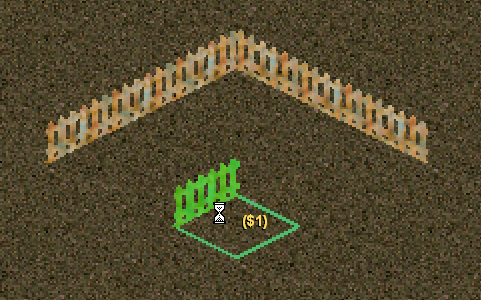
Description: Using this utility fence is an easy way to make sure you build the exhibit the size that you intended. Each fence section has a purchase price of $1. If you want one side of your exhibit to be 11 game tiles long, drop and drag this fence until the price shows $11. Do this for all remaining sides of your exhibit. This is a decorative fence so it is used as a template only. You will then need to replace all sections with either the invisible fence or any other suitable exhibit fence.
This fence is also useful to measure distances, especially for buildings that transport guests a specific number of tiles.
Since multiple fences use the same Decorative Wall messages, if you select one in the purchase menu, there are times when the selection will go to the first one in the menu: when the menu is closed and reopened, when the menu is switched to a different one and then back to the fences, when ZT goes through its unlocking logic that occurs at the beginning of some game months. We live with this in order not to use up IDs too quickly.
NOTE: The file at this site is a backup. Cricket gave permission for that. Before downloading from here, you should check the link at the end of this post to see if that is newer.
Click here to download FencePicketOneDollarUtility_clh.zip
-----
The main location for this download is at the following Zoo Tek Phoenix link, which is where it would be updated before anywhere else:
https://zootekphoenix.com/forums/files/file/5494-1-decorative-picket-utility-fence-by-cricket/
Author: Cricket
Keywords: decorative fence, utility file
Release date: October 8, 2021
Current ztd date: October 7, 2021
Zip size: 22.7 KB
Compatibility: All Game Versions
Description: Using this utility fence is an easy way to make sure you build the exhibit the size that you intended. Each fence section has a purchase price of $1. If you want one side of your exhibit to be 11 game tiles long, drop and drag this fence until the price shows $11. Do this for all remaining sides of your exhibit. This is a decorative fence so it is used as a template only. You will then need to replace all sections with either the invisible fence or any other suitable exhibit fence.
This fence is also useful to measure distances, especially for buildings that transport guests a specific number of tiles.
Since multiple fences use the same Decorative Wall messages, if you select one in the purchase menu, there are times when the selection will go to the first one in the menu: when the menu is closed and reopened, when the menu is switched to a different one and then back to the fences, when ZT goes through its unlocking logic that occurs at the beginning of some game months. We live with this in order not to use up IDs too quickly.
NOTE: The file at this site is a backup. Cricket gave permission for that. Before downloading from here, you should check the link at the end of this post to see if that is newer.
Click here to download FencePicketOneDollarUtility_clh.zip
-----
The main location for this download is at the following Zoo Tek Phoenix link, which is where it would be updated before anywhere else:
https://zootekphoenix.com/forums/files/file/5494-1-decorative-picket-utility-fence-by-cricket/
#8
Paths / LOTR Isengard Paths
Last post by Jay - October 12, 2025, 11:15:34 PMLOTR Isengard Paths

Author: Jay
Keywords: LOTR Isengard path
Release date: October 12, 2025
Current ztd date: October 12, 2025
Zip size: 38.8 KB
Compatibility: All Game Versions
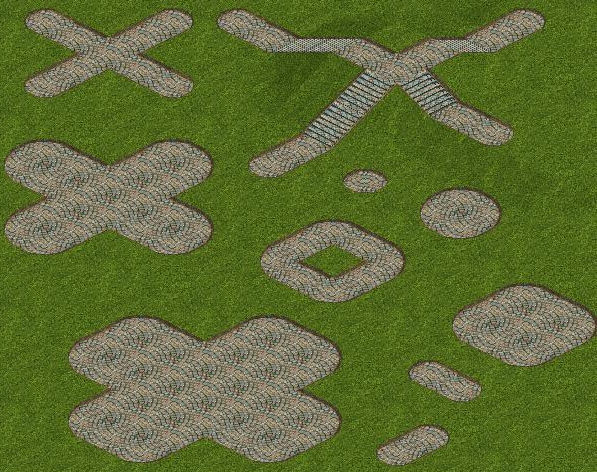
Description: The ztd has 2 paths: LOTR Isengard Path With Curved Ends and LOTR Isengard Path With Straight Ends, as shown in the screenshots. They are both made from a texture used by MidwestBoyInLA for RCT2. He used the name "LOTR Isengard Footpath", so I used a similar name, although these are slightly different than his.
Click here to download LOTRIsengardPathsByJay.zip
Author: Jay
Keywords: LOTR Isengard path
Release date: October 12, 2025
Current ztd date: October 12, 2025
Zip size: 38.8 KB
Compatibility: All Game Versions
Description: The ztd has 2 paths: LOTR Isengard Path With Curved Ends and LOTR Isengard Path With Straight Ends, as shown in the screenshots. They are both made from a texture used by MidwestBoyInLA for RCT2. He used the name "LOTR Isengard Footpath", so I used a similar name, although these are slightly different than his.
Click here to download LOTRIsengardPathsByJay.zip
#9
Fences and Walls and Zoo Entrances / Brick And Spear Fence
Last post by Jay - October 10, 2025, 04:57:26 AMBrick And Spear Fence
Author: Jay
Keywords: decorative brick spear fence
Release date: October 10, 2025
Current ztd date: October 9, 2025
Zip size: 19.9 KB
Compatibility: All Game Versions
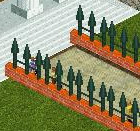
Description: This is a decorative brick and spear fence. It is inspired by a fence used at Disneyland's Haunted Mansion, but this is exaggerated to be seen more easily in ZT. This fence uses the Decorative Fence messages that are already in LANG--ZTCDD.dll.
Since multiple fences use the same Decorative Fence messages, if you select one in the purchase menu, there are times when the selection will go to the first one in the menu: when the menu is closed and reopened, when the menu is switched to a different one and then back to the fences, when ZT goes through its unlocking logic that occurs at the beginning of some game months. We live with this in order not to use up IDs too quickly.
Click here to download BrickAndSpearFenceByJay.zip
Author: Jay
Keywords: decorative brick spear fence
Release date: October 10, 2025
Current ztd date: October 9, 2025
Zip size: 19.9 KB
Compatibility: All Game Versions
Description: This is a decorative brick and spear fence. It is inspired by a fence used at Disneyland's Haunted Mansion, but this is exaggerated to be seen more easily in ZT. This fence uses the Decorative Fence messages that are already in LANG--ZTCDD.dll.
Since multiple fences use the same Decorative Fence messages, if you select one in the purchase menu, there are times when the selection will go to the first one in the menu: when the menu is closed and reopened, when the menu is switched to a different one and then back to the fences, when ZT goes through its unlocking logic that occurs at the beginning of some game months. We live with this in order not to use up IDs too quickly.
Click here to download BrickAndSpearFenceByJay.zip
#10
Buildings and Shelters and Toys / Haunted Mansion Ride
Last post by Jay - October 07, 2025, 03:48:44 AMHaunted Mansion Ride
Author: Jay
Keywords: haunted mansion ride
Release date: October 7, 2025
Current ztd date: October 6, 2025
Zip size: 3.04 MB
Compatibility: All Game Versions
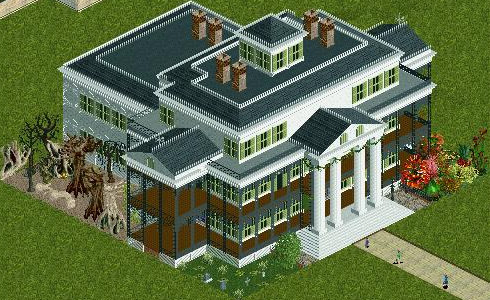
Description: When guests take a ride in this haunted mansion, they will be amazed and entertained by the grinning ghosts, spectral surprises, playful apparitions, and other spirited residents of this happy haunt. It is inspired by Disney's Haunted Mansions. The building itself represents the Haunted Mansion at Disneyland in California. A number of years ago, a number of designers in the RCT2 user community created a lot of Disneyland objects. That included objects for a Disney Haunted Mansion ride. They also used lots of tiny pieces to create the exterior of the building itself, as seen in the screenshot. So I do not take credit for that. I did not create it myself because they did a fantastic job at reproducing the actual Disneyland Haunted Mansion building. Here is a picture in Wikipedia of the actual building:
https://commons.wikimedia.org/wiki/File:Haunted_Mansion_July_4.jpg
I did the layout of things around the building from lots of things made for RCT2. When guests use this building in ZT, most of the top of the building will disappear so that the inside of it can be seen. The entire layout inside the building was made by me from lots of things made for RCT2. Some of those things are based on Disney's Haunted Mansion rides; some are based on other Disney rides, some are based on Harry Potter and Lord Of The Rings; the rest are other things that fit into a haunted mansion theme. The default price for guests to use the building is 13, since the "ghostfather clock" at Disney's Haunted Mansions strikes 13. Like Disney's Haunted Mansions, this is meant to be a playful haunt rather than a scary haunt. The layouts around and inside the Haunted Mansion were made by me using a lot of graphics made by The Amazing Earl, MidwestBoyInLA, Fisherman, Mama Bear, ToonTowner, Makonix/mkx/argonath, MKY, MKG, cjk, GW, Magnus/MG, hawk, Kahlua17, pierreluch, tom25489, Kumba, and others for RCT2, as well as some other graphics from RCT2. The sound is a combination of 2 sounds from Disney's Haunted Mansion: a snippet of the greeting and a snippet of the song Grim Grinning Ghosts.
(Configuration note: removes money.)
The haunted mansion messages are in LANG--ZTCDD.dll dated October 6, 2025 or newer, which can be downloaded at ZTCDD:
http://www.ztcdd.org/DD/index.php?topic=7315.0
Disneyland's Haunted Mansion has a special meaning to me. It was created when I was a boy. It was made before portable computers and cell phones existed. Computers back then had to be in their own air conditioned computer rooms. Those computers were expensive. So companies used computers for payroll, financial, and scheduling purposes. But Disney used a minicomputer in one of those air conditioned computer rooms to control everything in the Haunted Mansion. That showed me that computers can be used to bring enjoyment to others. So it inspired me to become a computer software engineer, making programs that control machines. As it turned out, I did this work for manufacturing companies rather than for entertainment companies. But that desire to use computers to try to bring enjoyment to others is what eventually led me to helping in the ZT user community.
Click here to download HauntedMansionRideByJay.zip
Author: Jay
Keywords: haunted mansion ride
Release date: October 7, 2025
Current ztd date: October 6, 2025
Zip size: 3.04 MB
Compatibility: All Game Versions
Description: When guests take a ride in this haunted mansion, they will be amazed and entertained by the grinning ghosts, spectral surprises, playful apparitions, and other spirited residents of this happy haunt. It is inspired by Disney's Haunted Mansions. The building itself represents the Haunted Mansion at Disneyland in California. A number of years ago, a number of designers in the RCT2 user community created a lot of Disneyland objects. That included objects for a Disney Haunted Mansion ride. They also used lots of tiny pieces to create the exterior of the building itself, as seen in the screenshot. So I do not take credit for that. I did not create it myself because they did a fantastic job at reproducing the actual Disneyland Haunted Mansion building. Here is a picture in Wikipedia of the actual building:
https://commons.wikimedia.org/wiki/File:Haunted_Mansion_July_4.jpg
I did the layout of things around the building from lots of things made for RCT2. When guests use this building in ZT, most of the top of the building will disappear so that the inside of it can be seen. The entire layout inside the building was made by me from lots of things made for RCT2. Some of those things are based on Disney's Haunted Mansion rides; some are based on other Disney rides, some are based on Harry Potter and Lord Of The Rings; the rest are other things that fit into a haunted mansion theme. The default price for guests to use the building is 13, since the "ghostfather clock" at Disney's Haunted Mansions strikes 13. Like Disney's Haunted Mansions, this is meant to be a playful haunt rather than a scary haunt. The layouts around and inside the Haunted Mansion were made by me using a lot of graphics made by The Amazing Earl, MidwestBoyInLA, Fisherman, Mama Bear, ToonTowner, Makonix/mkx/argonath, MKY, MKG, cjk, GW, Magnus/MG, hawk, Kahlua17, pierreluch, tom25489, Kumba, and others for RCT2, as well as some other graphics from RCT2. The sound is a combination of 2 sounds from Disney's Haunted Mansion: a snippet of the greeting and a snippet of the song Grim Grinning Ghosts.
(Configuration note: removes money.)
The haunted mansion messages are in LANG--ZTCDD.dll dated October 6, 2025 or newer, which can be downloaded at ZTCDD:
http://www.ztcdd.org/DD/index.php?topic=7315.0
Disneyland's Haunted Mansion has a special meaning to me. It was created when I was a boy. It was made before portable computers and cell phones existed. Computers back then had to be in their own air conditioned computer rooms. Those computers were expensive. So companies used computers for payroll, financial, and scheduling purposes. But Disney used a minicomputer in one of those air conditioned computer rooms to control everything in the Haunted Mansion. That showed me that computers can be used to bring enjoyment to others. So it inspired me to become a computer software engineer, making programs that control machines. As it turned out, I did this work for manufacturing companies rather than for entertainment companies. But that desire to use computers to try to bring enjoyment to others is what eventually led me to helping in the ZT user community.
Click here to download HauntedMansionRideByJay.zip