- Welcome to Zoo Tycoon Designer Guild.
Zoo Tycoon Designer Guild
Downloads plus information for ZT1 designers or ZT1 players
Recent posts
#71
Guides, Lists, and Notes for ZT1 Designers / Re: [cSuitableObjects] section...
Last post by Jay - March 16, 2021, 06:26:52 AM| [Member] | Name | Name ID | Habitat | Habitat ID | SE Icon | Internal name | Any user ID |
| foliage | Norfolk Island Pine Tree | 7093 | Coniferous Forest | 9403 | objects/norfolk/SE/SE | norfolk | |
| foliage | Orange Cup Coral | 7405 | Aquatic | 9413 | objects/cupcoral/SE/SE | cupcoral | |
| foliage | Orchid Tree | 7059 | Rainforest | 9405 | objects/orchid/SE/SE | orchid | 5003 |
| foliage | Pacific Dogwood Tree | 7007 | Deciduous Forest | 9402 | objects/pdogwood/SE/SE | pdogwood | |
| foliage | Palm Tree | 7010 | Desert | 9409 | objects/palm/icpalmSE/icpalmSE | palm | |
| foliage | Paper Birch Tree | 7064 | Highland | 9407 | objects/pbirch/SE/SE | pbirch | |
| foliage | Pine Bush | 7075 | Coniferous Forest | 9403 | objects/pineshrb/SE/SE | pineshrb | |
| foliage | Pine Tree | 7013 | Coniferous Forest | 9403 | objects/pine/SE/SE | pine | |
| foliage | Polar Bear Topiary | 6006 | 9414 | objects/tppbear/ictpbrSE/ictpbrSE | tppbear | ||
| foliage | Prickly Pear Cactus | 7039 | Desert | 9409 | objects/ppear/SE/SE | ppear | |
| foliage | Purple Sea Urchin | 7421 | Aquatic | 9413 | objects/urchin/SE/SE | urchin | |
| foliage | Quiver Tree | 7033 | Desert | 9409 | objects/quiver/SE/SE | quiver | |
| foliage | Rafflesia | 7432 | Rainforest | 9405 | objects/asiflow/SE/SE | asiflow | |
| foliage | Rainforest Bush | 7049 | Rainforest | 9405 | objects/bush2/SE/SE | bush2 | |
| foliage | Rainforest Fern | 7051 | Rainforest | 9405 | objects/bush4/SE/SE | bush4 | |
| foliage | Rainforest Flowers | 7428 | 9414 | objects/junflowr/SE/SE | junflowr | ||
| foliage | Rainforest Stump | 7429 | Rainforest | 9405 | objects/junstump/SE/SE | junstump | |
| foliage | Red Gorgonian | 7411 | Aquatic | 9413 | objects/redgorgo/SE/SE | redgorgo | |
| foliage | Red Gum Tree | 7030 | Savannah | 9400 | objects/redgum/SE/SE | redgum | |
| foliage | Rhinoceros Topiary | 6007 | 9414 | objects/tprhino/ictrhiSE/ictrhiSE | tprhino | ||
| foliage | Sage Bush | 7073 | Highland | 9407 | objects/sage/SE/SE | sage | |
| foliage | Saguaro Cactus | 7040 | Desert | 9409 | objects/saguaro/SE/SE | saguaro | |
| foliage | Sand Bush | 7205 | Desert | 9409 | objects/sandbush/SE/SE | sandbush | |
| foliage | Sand Dollar | 7413 | Aquatic | 9413 | objects/sdollar/SE/SE | sdollar | |
| foliage | Sargassum | 7412 | Aquatic | 9413 | objects/sargass/SE/SE | sargass | |
| foliage | Savannah Flowers | 7425 | 9414 | objects/afflower/SE/SE | afflower | ||
| foliage | Sea Anemone | 7400 | Aquatic | 9413 | objects/anemone/SE/SE | anemone | |
| foliage | Sea Cucumber | 7414 | Aquatic | 9413 | objects/seacuke/SE/SE | seacuke | |
| foliage | Sea Grass | 7417 | Aquatic | 9413 | objects/sgrass/SE/SE | sgrass | |
| foliage | Sea Lettuce | 7410 | Aquatic | 9413 | objects/lettuce/SE/SE | lettuce | |
| foliage | Sea Sponge | 7418 | Aquatic | 9413 | objects/sponge/SE/SE | sponge | |
| foliage | Sea Star | 7415 | Aquatic | 9413 | objects/seastar/SE/SE | seastar | |
| foliage | Seaweed | 7416 | Aquatic | 9413 | objects/seaweed/SE/SE | seaweed | |
| foliage | Senegal Date Palm | 7426 | Savannah | 9400 | objects/aftree/SE/SE | aftree | |
| foliage | Sigillaria Tree | 7094 | Savannah | 9400 | objects/sigillar/SE/SE | sigillar | |
| foliage | Snowbell Tree | 7431 | Deciduous Forest | 9402 | objects/japtree/SE/SE | japtree | |
| foliage | Snowy Bush | 7423 | Tundra | 9408 | objects/snowbush/SE/SE | snowbush | |
| foliage | Snowy Grass | 7424 | Tundra | 9408 | objects/snograss/SE/SE | snograss | |
| foliage | Snowy Tree | 7422 | Tundra | 9408 | objects/snowtree/SE/SE | snowtree | |
| foliage | Spiral Topiary | 6008 | 9414 | objects/tpspiral/ictsprSE/ictsprSE | tpspiral | ||
| foliage | Spruce Tree | 7023 | Coniferous Forest | 9403 | objects/wspruce/SE/SE | wspruce | |
| foliage | Stove Pipe Sponge | 7419 | Aquatic | 9413 | objects/stovpipe/SE/SE | stovpipe | |
| foliage | Tall Grass | 7060 | Savannah | 9400 | objects/savgrass/SE/SE | savgrass | |
| foliage | Thorn Acacia Tree | 7001 | Savannah | 9400 | objects/whtthrna/SE/SE | whtthrna | |
| foliage | Thorn Bush | 7048 | Savannah | 9400 | objects/bush1/SE/SE | bush1 | |
| foliage | Thornless Mesquite Tree | 7020 | Deciduous Forest | 9402 | objects/tmesquit/SE/SE | tmesquit | |
| foliage | Thouarsus Cycad Tree | 7082 | Rainforest | 9405 | objects/cycad/SE/SE | cycad | |
| foliage | Trembling Aspen Tree | 7026 | Deciduous Forest | 9402 | objects/taspen/SE/SE | taspen | |
| foliage | Tube Worm | 7420 | Aquatic | 9413 | objects/tubeworm/SE/SE | tubeworm | |
| foliage | Ulmo Tree | 7005 | Rainforest | 9405 | objects/ulmo/SE/SE | ulmo | |
| foliage | Umbrella Thorn Tree | 7058 | Savannah | 9400 | objects/umbacac/SE/SE | umbacac | |
| foliage | Walchian Conifer Tree | 7081 | Coniferous Forest | 9403 | objects/conifer/SE/SE | conifer | |
| foliage | Water Lily | 7061 | Aquatic | 9413 | objects/wtrlily/SE/SE | wtrlily | |
| foliage | Water Reed | 7062 | Aquatic | 9413 | objects/wtrreed/SE/SE | wtrreed | |
| foliage | Weeping Willow Tree | 7066 | Deciduous Forest | 9402 | objects/weepwill/SE/SE | weepwill | |
| foliage | Western Juniper Tree | 7071 | Highland | 9407 | objects/wjuniper/SE/SE | wjuniper | |
| foliage | Western Larch Tree | 7025 | Highland | 9407 | objects/glarch/SE/SE | glarch | |
| foliage | Western Red Cedar Tree | 7068 | Coniferous Forest | 9403 | objects/wrcedar/SE/SE | wrcedar | |
| foliage | White Oak Tree | 7067 | Deciduous Forest | 9402 | objects/woak/SE/SE | woak | |
| foliage | Wild Olive Tree | 7004 | Deciduous Forest | 9402 | objects/wolive/SE/SE | wolive | |
| foliage | Williamsonia Tree | 7095 | Rainforest | 9405 | objects/williams/SE/SE | williams | |
| foliage | Yellow Cedar Tree | 7024 | Coniferous Forest | 9403 | objects/westceda/SE/SE | westceda | |
| foliage | Yellow Fever Tree | 7056 | Savannah | 9400 | objects/yfacacia/SE/SE | yfacacia | |
| foliage | Yew Tree | 7021 | Coniferous Forest | 9403 | objects/yew/SE/SE | yew | |
| foliage | Yucca Tree | 7435 | Desert | 9409 | objects/mexyucca/SE/SE | mexyucca |
#72
Guides, Lists, and Notes for ZT1 Designers / Re: [cSuitableObjects] section...
Last post by Jay - March 16, 2021, 06:26:25 AM| [Member] | Name | Name ID | Habitat | Habitat ID | SE Icon | Internal name | Any user ID |
| foliage | Acacia Caffra Tree | 7000 | Savannah | 9400 | objects/acacia/icacatSE/icacatSE | acacia | |
| foliage | Agave Cactus | 7436 | Desert | 9409 | objects/mexagave/SE/SE | mexagave | |
| foliage | Arctic Birch Tree | 7096 | Tundra | 9408 | objects/arctbrch/SE/SE | arctbrch | |
| foliage | Arctic Bush | 7098 | Tundra | 9408 | objects/arctshrb/SE/SE | arctshrb | |
| foliage | Arctic Grass | 7097 | Tundra | 9408 | objects/arctgrss/SE/SE | arctgrss | |
| foliage | Bald Cypress Tree | 7083 | Aquatic | 9413 | objects/cypressd/SE/SE | cypress | |
| foliage | Bald Cypress Tree | 7083 | Aquatic | 9413 | objects/cypressd/SE/SE | cypressd | |
| foliage | Bamboo | 7016 | Highland | 9407 | objects/bamboo/SE/SE | bamboo | |
| foliage | Baobab Tree | 7057 | Savannah | 9400 | objects/baobob/SE/SE | baobob | |
| foliage | Barnacles | 7401 | Aquatic | 9413 | objects/barnacle/SE/SE | barnacle | |
| foliage | Beach Grass | 7402 | Aquatic | 9413 | objects/bchgrass/SE/SE | bchgrass | |
| foliage | Birch Tree | 7022 | Deciduous Forest | 9402 | objects/birch/SE/SE | birch | |
| foliage | Bonsai | 7430 | Deciduous Forest | 9402 | objects/japbush/SE/SE | japbush | |
| foliage | Brittle Sea Star | 7403 | Aquatic | 9413 | objects/britstar/SE/SE | britstar | |
| foliage | Broadleaf Bush | 7074 | Grassland | 9401 | objects/grshrub/SE/SE | grshrub | |
| foliage | Cherry Tree | 7008 | Deciduous Forest | 9402 | objects/cherry/SE/SE | cherry | |
| foliage | Chinese Fir Tree | 7069 | Coniferous Forest | 9403 | objects/cfir/SE/SE | cfir | |
| foliage | Clam Bed | 7404 | Aquatic | 9413 | objects/clambed/SE/SE | clambed | |
| foliage | Club Moss Shrub | 7080 | Coniferous Forest | 9403 | objects/clubmoss/SE/SE | clubmoss | |
| foliage | Dawn Redwood Tree | 7084 | Coniferous Forest | 9403 | objects/dawnred/SE/SE | dawnred | |
| foliage | Deciduous Bush | 7050 | Deciduous Forest | 9402 | objects/bush3/SE/SE | bush3 | |
| foliage | Decorative Hedge | 9309 | 9414 | objects/hedge/SE/SE | hedge | ||
| foliage | Desert Flowers | 7207 | 9414 | objects/sflowers/SE/SE | sflowers | ||
| foliage | Divercate Tree Coral | 7406 | Aquatic | 9413 | objects/dtcoral/SE/SE | dtcoral | |
| foliage | Doum Palm Tree | 7206 | Desert | 9409 | objects/doumpalm/SE/SE | doumpalm | |
| foliage | Durian Tree | 7434 | Rainforest | 9405 | objects/asiduria/SE/SE | asiduria | 5506 |
| foliage | Elephant Ear Tree | 7015 | Rainforest | 9405 | objects/eleear/SE/SE | eleear | |
| foliage | Elephant Topiary | 6004 | 9414 | objects/tpele/icteleSE/icteleSE | tpele | ||
| foliage | Elm Tree | 7006 | Deciduous Forest | 9402 | objects/elm/SE/SE | elm | |
| foliage | Eucalyptus Tree | 7017 | Savannah | 9400 | objects/eucalyp/SE/SE | eucalyp | |
| foliage | Fallen Rainforest Tree | 7427 | Rainforest | 9405 | objects/juntree/SE/SE | juntree | |
| foliage | Feather Duster Worm | 7407 | Aquatic | 9413 | objects/fdstworm/SE/SE | fdstworm | |
| foliage | Fern Bush | 7085 | Rainforest | 9405 | objects/fernbush/SE/SE | fernbush | |
| foliage | Fir Tree | 7012 | Coniferous Forest | 9403 | objects/fir/SE/SE | fir | |
| foliage | Fire Coral | 7408 | Aquatic | 9413 | objects/fircoral/SE/SE | fircoral | |
| foliage | Flowerbed | 6026 | 9414 | objects/flower1/SE/SE | flower1 | ||
| foliage | Flowerbed | 6028 | 9414 | objects/flower2/SE/SE | flower2 | ||
| foliage | Flowerbed | 6029 | 9414 | objects/flower3/SE/SE | flower3 | ||
| foliage | Flowerbed | 6030 | 9414 | objects/flower4/SE/SE | flower4 | ||
| foliage | Foxtail Palm Tree | 7018 | Rainforest | 9405 | objects/foxtail/SE/SE | foxtail | |
| foliage | Giant Ficus Tree | 7433 | Rainforest | 9405 | objects/asitree/SE/SE | asitree | |
| foliage | Gingko Tree | 7086 | Deciduous Forest | 9402 | objects/gingkos/SE/SE | gingkos | |
| foliage | Giraffe Topiary | 6005 | 9414 | objects/tpgiraf/ictgirSE/ictgirSE | tpgiraf | ||
| foliage | Globe Willow Tree | 7028 | Deciduous Forest | 9402 | objects/willow/SE/SE | willow | |
| foliage | Glossopteris Tree | 7087 | Deciduous Forest | 9402 | objects/glossop/SE/SE | glossop | |
| foliage | Grass Tree | 7063 | Savannah | 9400 | objects/grasstr/SE/SE | grasstr | |
| foliage | Hard Quandong Tree | 7019 | Savannah | 9400 | objects/hquandon/SE/SE | hquandon | |
| foliage | Himalayan Birch Tree | 7070 | Highland | 9407 | objects/hbirch/SE/SE | hbirch | |
| foliage | Himalayan Pine Tree | 7072 | Highland | 9407 | objects/hpine/SE/SE | hpine | |
| foliage | Holiday Tree | 7077 | Many | 9411 | objects/xmastree/SE/SE | xmastree | |
| foliage | Horsetail | 7088 | Aquatic | 9413 | objects/horstail/SE/SE | horstail | |
| foliage | Japanese Maple Tree | 7035 | Deciduous Forest | 9402 | objects/jmaple/SE/SE | jmaple | |
| foliage | Joshua Tree | 7029 | Desert | 9409 | objects/joshua/SE/SE | joshua | |
| foliage | Kapok Tree | 7065 | Rainforest | 9405 | objects/kapok/SE/SE | kapok | |
| foliage | Kelp | 7409 | Aquatic | 9413 | objects/kelp/SE/SE | kelp | |
| foliage | Khejri Tree | 7076 | Savannah | 9400 | objects/khejri/SE/SE | khejri | |
| foliage | Large Flowerbed | 6031 | 9414 | objects/flower5/SE/SE | flower5 | ||
| foliage | Large Flowerbed | 6090 | 9414 | objects/flower6/SE/SE | flower6 | ||
| foliage | Large Flowerbed | 6091 | 9414 | objects/flower7/SE/SE | flower7 | ||
| foliage | Lepidodendron Tree | 7089 | Coniferous Forest | 9403 | objects/lepidod/SE/SE | lepidod | |
| foliage | Leptocycas Tree | 7090 | Rainforest | 9405 | objects/lepto/SE/SE | lepto | |
| foliage | Llala Palm Tree | 7042 | Rainforest | 9405 | objects/shrtpalm/SE/SE | shrtpalm | |
| foliage | Lodgepole Pine Tree | 7009 | Coniferous Forest | 9403 | objects/lodgpine/SE/SE | lodgpine | |
| foliage | Magnolia Tree | 7091 | Deciduous Forest | 9402 | objects/magnolia/SE/SE | magnolia | |
| foliage | Mangrove Tree | 7014 | Rainforest | 9405 | objects/mangrove/SE/SE | mangrove | |
| foliage | Maple Tree | 7011 | Deciduous Forest | 9402 | objects/maple/icmaplSE/icmaplSE | maple | |
| foliage | Monkey Puzzle Tree | 7092 | Grassland | 9401 | objects/monkpuzz/SE/SE | monkpuzz |
#73
Guides, Lists, and Notes for ZT1 Designers / [cSuitableObjects] section in ...
Last post by Jay - March 16, 2021, 06:25:35 AMUsually the configuration for an animal made for ZT includes a [cSuitableObjects] section. The [cSuitableObjects] section says what objects the animal likes and dislikes. This section can include object dll IDs, object internal names (APE IDs), and habitat IDs. In the case of internal names, one of the first 3 characters has to be a letter in order for ZT to recognize it as an internal name. The lines in the [cSuitableObjects] section are in pairs. For example, the first pair of lines in the [cSuitableObjects] section for the Bengal Tiger are:
v = 9410
v = -10
9410 is the habitat ID for "Non-habitat" objects, which includes the shelters that come with ZT. Since "-20" is a negative number, that means the tiger does not like any of ZT's shelters by default. But to see if a specific object is liked or tolerated, one has to look for 2 things in this section: the object's ID, and the object's habitat ID. As an example, the Bengal Tiger likes 7 of the shelters that come with ZT. Its favorite shelter is the Rock Cave, which has a dll ID of 8100 and a habitat ID of 9410. The [cSuitableObjects] section for the Bengal Tiger includes the following pair of lines:
v = 8100
v = 22
That means the Bengal Tiger likes the Rock Cave by 22, before taking the habitat into account. Since the Bengal Tiger dislikes the 9410 habitat ID by -10, ZT adds the 22 and -10 together, giving the total of 12. Since that total is greater than 0, the Bengal Tiger likes the Rock Cave. If the total is less than 0, the animal dislikes the object. If the total equals 0, the animal tolerates the object. The Tank Filter is an example of an object that the Bengal Tiger tolerates. The Tank Filter has a dll ID of 6471 and a habitat ID of 9414 ("Bad-habitat"). The [cSuitableObjects] section for the Bengal Tiger includes the following pairs of lines:
v = 9414
v = -100
...
v = 6471
v = 100
ZT adds the -100 and 100 together, giving a total of 0. Being that the total is 0, the Bengal Tiger tolerates the Tank Filter. As an example of something the Bengal Tiger dislikes, most animals are configured to dislike poo, which has a dll ID of 6062 and a habitat ID of 9412 ("Null Habitat"). 9412 is not in the [cSuitableObjects] section for the Bengal Tiger, so that is the same as being there with a value of 0. But 6062 is in the [cSuitableObjects] section:
v = 6062
v = -5
ZT adds 0 and -5 together, giving a total of -5. Being that the total is less than 0, the Bengal Tiger dislikes poo. As another example, we will look at whether or not the Bengal Tiger likes its preferred object. The configuration for the Bengal Tiger includes "cPrefIconID = 7014" (Mangrove Tree). The habitat of the Mangrove Tree is 9405 (Rainforest). 9405 and 7014 are in the [cSuitableObjects] section for the Bengal Tiger. These are the pairs of lines we see in the [cSuitableObjects] section for those:
v = 9405
v = 3
...
v = 7014
v = 7
Although it is obvious from the above that the animal likes both the Rainforest habitat and the Mangrove Tree, ZT will still add the values together. When we add 3 and 7 together, we get 10. Since 10 is greater than 0, the tiger likes the Mangrove Tree. Although an animal can like its preferred object just from the habitat ID, it is recommended to always include the preferred object ID in the [cSuitableObjects] section so it is obvious that the prefferred object is liked just by looking at the uca/ai file. For suitability purposes, ZT also takes the object's footprint into account. So if an animal likes a full tile foliage object by 5 and a quarter tile foliage object by 5, and they both have the same habitat ID, the quarter tile object is better for suitability, since four can fit in one tile.
When making a new animal for ZT, a designer has to decide what habitats and objects their animal will like, dislike, and tolerate. In order to help with that for objects that come with ZT, the rest of this topic shows the object's ID, habitat ID, and internal name for the objects that come with ZT or were available as official downloads. The lists also include a "SE Icon" column. When an object is used as an animal's preferred object, cPrefIconID is set to the object's ID in the [m/Characteristics/Integers], [f/Characteristics/Integers], and [y/Characteristics/Integers] sections in the animal configuration. cPrefIconID should be in all three of those sections so that the tooltip for the object can appear for males, females, and young. In addition to setting cPrefIconID, cPrefIcon in the animal configuration would be set to the corresponding setting that is in the "SE Icon" column of these lists. So when the Mangrove Tree is the preferred object, cPrefIconID is set to 7014 and cPrefIcon is set to objects/mangrove/SE/SE. The lists also have an "Any user ID" column. When something is in that column, only certain ZT animals can use that object and no user made animal can use it. That is especially useful for shelters. For example, the Rock Cave has something in that column. So a user made animal cannot go in ZT's Rock Cave, although a user made animal can like or tolerate ZT's Rock Cave. Because of that, if a user made animal is configured to need a shelter, the concrete shelters should be included in the [cSuitableObjects] section, since those can be used by any animal. Similarly, no toy or show toy can be used by a user made animal. For completeness, the following lists include developer objects, paths, fences, and uncategorized objects (called "unknown"), although I am not aware of any of those being in the [cSuitableObjects] section for any animal, other than poo and the tank filter.
v = 9410
v = -10
9410 is the habitat ID for "Non-habitat" objects, which includes the shelters that come with ZT. Since "-20" is a negative number, that means the tiger does not like any of ZT's shelters by default. But to see if a specific object is liked or tolerated, one has to look for 2 things in this section: the object's ID, and the object's habitat ID. As an example, the Bengal Tiger likes 7 of the shelters that come with ZT. Its favorite shelter is the Rock Cave, which has a dll ID of 8100 and a habitat ID of 9410. The [cSuitableObjects] section for the Bengal Tiger includes the following pair of lines:
v = 8100
v = 22
That means the Bengal Tiger likes the Rock Cave by 22, before taking the habitat into account. Since the Bengal Tiger dislikes the 9410 habitat ID by -10, ZT adds the 22 and -10 together, giving the total of 12. Since that total is greater than 0, the Bengal Tiger likes the Rock Cave. If the total is less than 0, the animal dislikes the object. If the total equals 0, the animal tolerates the object. The Tank Filter is an example of an object that the Bengal Tiger tolerates. The Tank Filter has a dll ID of 6471 and a habitat ID of 9414 ("Bad-habitat"). The [cSuitableObjects] section for the Bengal Tiger includes the following pairs of lines:
v = 9414
v = -100
...
v = 6471
v = 100
ZT adds the -100 and 100 together, giving a total of 0. Being that the total is 0, the Bengal Tiger tolerates the Tank Filter. As an example of something the Bengal Tiger dislikes, most animals are configured to dislike poo, which has a dll ID of 6062 and a habitat ID of 9412 ("Null Habitat"). 9412 is not in the [cSuitableObjects] section for the Bengal Tiger, so that is the same as being there with a value of 0. But 6062 is in the [cSuitableObjects] section:
v = 6062
v = -5
ZT adds 0 and -5 together, giving a total of -5. Being that the total is less than 0, the Bengal Tiger dislikes poo. As another example, we will look at whether or not the Bengal Tiger likes its preferred object. The configuration for the Bengal Tiger includes "cPrefIconID = 7014" (Mangrove Tree). The habitat of the Mangrove Tree is 9405 (Rainforest). 9405 and 7014 are in the [cSuitableObjects] section for the Bengal Tiger. These are the pairs of lines we see in the [cSuitableObjects] section for those:
v = 9405
v = 3
...
v = 7014
v = 7
Although it is obvious from the above that the animal likes both the Rainforest habitat and the Mangrove Tree, ZT will still add the values together. When we add 3 and 7 together, we get 10. Since 10 is greater than 0, the tiger likes the Mangrove Tree. Although an animal can like its preferred object just from the habitat ID, it is recommended to always include the preferred object ID in the [cSuitableObjects] section so it is obvious that the prefferred object is liked just by looking at the uca/ai file. For suitability purposes, ZT also takes the object's footprint into account. So if an animal likes a full tile foliage object by 5 and a quarter tile foliage object by 5, and they both have the same habitat ID, the quarter tile object is better for suitability, since four can fit in one tile.
When making a new animal for ZT, a designer has to decide what habitats and objects their animal will like, dislike, and tolerate. In order to help with that for objects that come with ZT, the rest of this topic shows the object's ID, habitat ID, and internal name for the objects that come with ZT or were available as official downloads. The lists also include a "SE Icon" column. When an object is used as an animal's preferred object, cPrefIconID is set to the object's ID in the [m/Characteristics/Integers], [f/Characteristics/Integers], and [y/Characteristics/Integers] sections in the animal configuration. cPrefIconID should be in all three of those sections so that the tooltip for the object can appear for males, females, and young. In addition to setting cPrefIconID, cPrefIcon in the animal configuration would be set to the corresponding setting that is in the "SE Icon" column of these lists. So when the Mangrove Tree is the preferred object, cPrefIconID is set to 7014 and cPrefIcon is set to objects/mangrove/SE/SE. The lists also have an "Any user ID" column. When something is in that column, only certain ZT animals can use that object and no user made animal can use it. That is especially useful for shelters. For example, the Rock Cave has something in that column. So a user made animal cannot go in ZT's Rock Cave, although a user made animal can like or tolerate ZT's Rock Cave. Because of that, if a user made animal is configured to need a shelter, the concrete shelters should be included in the [cSuitableObjects] section, since those can be used by any animal. Similarly, no toy or show toy can be used by a user made animal. For completeness, the following lists include developer objects, paths, fences, and uncategorized objects (called "unknown"), although I am not aware of any of those being in the [cSuitableObjects] section for any animal, other than poo and the tank filter.
#74
Guides, Lists, and Notes for ZT1 Designers / Re: [cCompatibleAnimals] secti...
Last post by Jay - March 16, 2021, 03:18:34 AM| [Member] | Name | Name ID | Habitat | Habitat ID | Family | Family ID | Genus | Genus ID | Internal name |
| animals | Narwhal | 5407 | Aquatic | 9413 | Cetacea | 5218 | West Indian Manatee | 5175 | narwhal |
| animals | Okapi | 5028 | Rainforest | 9405 | Even-Toed Ungulate | 5205 | Giraffe | 5117 | okapi |
| animals | Olive Baboon | 5019 | Savannah | 9400 | Primate | 5203 | Ape | 5103 | baboon |
| animals | Orangutan | 5506 | Rainforest | 9405 | Primate | 5203 | Ape | 5103 | orngutan |
| animals | Orca | 5400 | Aquatic | 9413 | Cetacea | 5218 | Orca | 5159 | orca |
| animals | Ostrich | 5038 | Savannah | 9400 | Bird | 5211 | Ostrich | 5122 | ostrich |
| animals | Pacific Octopus | 5415 | Aquatic | 9413 | Octopodidae | 5227 | Giant Pacific Octopus | 5174 | octopus |
| animals | Pacific Walrus | 5417 | Aquatic | 9413 | Pinniped | 5223 | Pacific Walrus | 5176 | walrus |
| animals | Plains Zebra | 5004 | Savannah | 9400 | Odd-Toed Ungulate | 5204 | Horse | 5104 | zebra |
| animals | Plateosaurus | 5328 | Deciduous Forest | 9402 | Dinosaur | 5216 | Plateosaurus | 5153 | plateo |
| animals | Plesiosaurus | 5098 | Aquatic | 9413 | Dinosaur | 5216 | Plesiosaurus | 5148 | plesio |
| animals | Polar Bear | 5002 | Tundra | 9408 | Bear | 5202 | Bear | 5102 | polarbr |
| animals | Przewalski's Wild Horse | 5509 | Grassland | 9401 | Odd-Toed Ungulate | 5204 | Horse | 5104 | przewals |
| animals | Red Kangaroo | 5023 | Savannah | 9400 | Marsupial | 5210 | Kangaroo | 5113 | kangaroo |
| animals | Reindeer | 5300 | Tundra | 9408 | Even-Toed Ungulate | 5205 | Deer | 5129 | reindeer |
| animals | Saber-toothed Cat | 5086 | Tundra | 9408 | Dinosaur | 5216 | Saber-toothed Cat | 5136 | smilo |
| animals | Sable Antelope | 5079 | Savannah | 9400 | Even-Toed Ungulate | 5205 | Antelope | 5132 | sablea |
| animals | Saltwater Crocodile | 5041 | Aquatic | 9413 | Crocodile | 5213 | Crocodile | 5123 | swcroc |
| animals | Shortfin Mako Shark | 5411 | Aquatic | 9413 | Lamniformes | 5219 | Shortfin Mako Shark | 5170 | mako |
| animals | Siberian Tiger | 5008 | Coniferous Forest | 9403 | Cat | 5206 | Tiger | 5107 | stiger |
| animals | Snow Leopard | 5012 | Highland | 9407 | Cat | 5206 | Leopard | 5109 | snowlep |
| animals | Southern Sea Otter | 5414 | Aquatic | 9413 | Mustelidae | 5230 | Southern Sea Otter | 5173 | seaotter |
| animals | Sperm Whale | 5406 | Aquatic | 9413 | Cetacea | 5218 | Sperm Whale | 5165 | spermwhl |
| animals | Spinosaurus | 5091 | Coniferous Forest | 9403 | Dinosaur | 5216 | Spinosaurus | 5141 | spino |
| animals | Spotted Hyena | 5018 | Savannah | 9400 | Hyena | 5208 | Hyena | 5130 | hyena |
| animals | Stegosaurus | 5099 | Coniferous Forest | 9403 | Dinosaur | 5216 | Stegosaurus | 5149 | stego |
| animals | Styracosaurus | 5092 | Deciduous Forest | 9402 | Dinosaur | 5216 | Styracosaurus | 5142 | styraco |
| animals | Thomson's Gazelle | 5005 | Savannah | 9400 | Even-Toed Ungulate | 5205 | Gazelle | 5105 | gazelle |
| animals | Tiger Shark | 5410 | Aquatic | 9413 | Carcharhiniformes | 5221 | Tiger Shark | 5169 | tigersh |
| animals | Triceratops | 5046 | Savannah | 9400 | Dinosaur | 5216 | Triceratops | 5157 | tritops |
| animals | Tyrannosaurus rex | 5085 | Grassland | 9401 | Dinosaur | 5216 | Tyrannosaurus | 5135 | trex |
| animals | Unicorn | 5049 | Deciduous Forest | 9402 | Fantastic Creature | 5217 | Monster | 5134 | unicorn |
| animals | Velociraptor | 5093 | Coniferous Forest | 9403 | Dinosaur | 5216 | Velociraptor | 5143 | velocira |
| animals | West Indian Manatee | 5416 | Aquatic | 9413 | Sirenia | 5224 | West Indian Manatee | 5175 | seacow |
| animals | Whale Shark | 5504 | Aquatic | 9413 | Orectolobiformes | 5233 | Whale Shark | 5185 | whleshrk |
| animals | White Bengal Tiger | 5045 | Rainforest | 9405 | Cat | 5206 | Tiger | 5107 | wtiger |
| animals | Wooly Mammoth | 5329 | Tundra | 9408 | Dinosaur | 5216 | Mammuthus | 5154 | wolmam |
| animals | Wooly Rhino | 5330 | Tundra | 9408 | Dinosaur | 5216 | Coelodonta | 5155 | wolrhn |
| animals | Yeti | 19000 | Tundra | 9408 | Fantastic Creature | 5217 | Monster | 5134 | B101B026 |
#75
Guides, Lists, and Notes for ZT1 Designers / Re: [cCompatibleAnimals] secti...
Last post by Jay - March 16, 2021, 03:18:08 AM| [Member] | Name | Name ID | Habitat | Habitat ID | Family | Family ID | Genus | Genus ID | Internal name |
| animals | African Buffalo | 5030 | Savannah | 9400 | Even-Toed Ungulate | 5205 | Buffalo | 5118 | afrbuf |
| animals | African Elephant | 5000 | Savannah | 9400 | Primitive Ungulate | 5200 | Elephant | 5100 | elephant |
| animals | African Warthog | 5043 | Savannah | 9400 | Pig | 5215 | Pig | 5125 | warthog |
| animals | African Wild Dog | 5500 | Savannah | 9400 | Canine | 5207 | Canine | 5207 | wilddog |
| animals | Allosaurus | 5094 | Rainforest | 9405 | Dinosaur | 5216 | Allosaurus | 5144 | allo |
| animals | American Bighorn Sheep | 5032 | Highland | 9407 | Even-Toed Ungulate | 5205 | Sheep | 5127 | bighorn |
| animals | American Bison | 5026 | Grassland | 9401 | Even-Toed Ungulate | 5205 | Bison | 5116 | bison |
| animals | Ankylosaurus | 5087 | Savannah | 9400 | Dinosaur | 5216 | Ankylosaurus | 5137 | ankylo |
| animals | Apatosaurus | 5325 | Deciduous Forest | 9402 | Dinosaur | 5216 | Apatosaurus | 5150 | apato |
| animals | Arctic Wolf | 5048 | Tundra | 9408 | Canine | 5207 | Wolf | 5111 | arcwolf |
| animals | Asian Black Bear | 5080 | Highland | 9407 | Bear | 5202 | Bear | 5102 | asblckbr |
| animals | Asian Elephant | 5081 | Rainforest | 9405 | Primitive Ungulate | 5200 | Elephant | 5100 | asianele |
| animals | Atlantic Swordfish | 5420 | Aquatic | 9413 | Perciformes | 5229 | North Atlantic Swordfish | 5179 | marlin |
| animals | Beluga | 5413 | Aquatic | 9413 | Cetacea | 5218 | Beluga | 5172 | beluga |
| animals | Bengal Tiger | 5007 | Rainforest | 9405 | Cat | 5206 | Tiger | 5107 | tiger |
| animals | Bigfoot | 5514 | Coniferous Forest | 9403 | Fantastic Creature | 5217 | Monster | 5134 | bigfoot |
| animals | Black Bear | 5017 | Deciduous Forest | 9402 | Bear | 5202 | Bear | 5102 | blackbr |
| animals | Black Leopard | 5011 | Rainforest | 9405 | Cat | 5206 | Leopard | 5109 | blacklep |
| animals | Black Rhinoceros | 5024 | Savannah | 9400 | Odd-Toed Ungulate | 5204 | Rhinoceros | 5114 | brhino |
| animals | Blackbuck | 5076 | Savannah | 9400 | Even-Toed Ungulate | 5205 | Antelope | 5132 | blckbuck |
| animals | Bluefin Tuna | 5422 | Aquatic | 9413 | Perciformes | 5229 | Bluefin Tuna | 5181 | tuna |
| animals | Bongo | 5077 | Rainforest | 9405 | Even-Toed Ungulate | 5205 | Antelope | 5132 | bongo |
| animals | Bottlenose Dolphin | 5402 | Aquatic | 9413 | Cetacea | 5218 | Bottlenose Dolphin | 5161 | dolphin |
| animals | Bowhead Whale | 5517 | Aquatic | 9413 | Cetacea | 5218 | Bowhead Whale | 5187 | bowhead |
| animals | California Sea Lion | 5040 | Aquatic | 9413 | Pinniped | 5223 | Sea Lion | 5131 | sealion |
| animals | Camptosaurus | 5095 | Coniferous Forest | 9403 | Dinosaur | 5216 | Camptosaurus | 5145 | campto |
| animals | Caudipteryx | 5096 | Rainforest | 9405 | Dinosaur | 5216 | Caudipteryx | 5146 | caudipt |
| animals | Cheetah | 5009 | Savannah | 9400 | Cat | 5206 | Cheetah | 5108 | cheetah |
| animals | Chimpanzee | 5003 | Rainforest | 9405 | Primate | 5203 | Ape | 5103 | chimp |
| animals | Clouded Leopard | 5013 | Rainforest | 9405 | Cat | 5206 | Leopard | 5109 | cloulep |
| animals | Coelophysis | 5326 | Rainforest | 9405 | Dinosaur | 5216 | Coelophysis | 5151 | coelo |
| animals | Common Sawfish | 5510 | Aquatic | 9413 | Rajiformes | 5237 | Sawfish | 5189 | sawfish |
| animals | Common Wildebeest | 5025 | Savannah | 9400 | Even-Toed Ungulate | 5205 | Wildebeest | 5115 | wildebst |
| animals | Deinosuchus | 5332 | Aquatic | 9413 | Dinosaur | 5216 | Deinosuchus | 5158 | deino |
| animals | Dromedary Camel | 5034 | Desert | 9409 | Even-Toed Ungulate | 5205 | Camel | 5119 | dromcaml |
| animals | Elephant Seal | 5404 | Aquatic | 9413 | Pinniped | 5223 | Northern Elephant Seal | 5163 | eleseal |
| animals | Emperor Penguin | 5039 | Tundra | 9408 | Bird | 5211 | Penguin | 5126 | emppeng |
| animals | Gallimimus | 5088 | Coniferous Forest | 9403 | Dinosaur | 5216 | Gallimimus | 5138 | gallim |
| animals | Gemsbok | 5031 | Desert | 9409 | Even-Toed Ungulate | 5205 | Gazelle | 5105 | gemsbok |
| animals | Giant Anteater | 5042 | Rainforest | 9405 | Edentate | 5214 | Anteater | 5124 | anteater |
| animals | Giant Ground Sloth | 5501 | Grassland | 9401 | Dinosaur | 5216 | Komodo Dragon | 5184 | megath |
| animals | Giant Panda | 5001 | Highland | 9407 | Raccoon | 5201 | Panda | 5101 | panda |
| animals | Giant Squid | 5421 | Aquatic | 9413 | Architeuthidae | 5228 | Giant Squid | 5180 | gsquid |
| animals | Giant Tortoise | 5331 | Tundra | 9408 | Dinosaur | 5216 | Meiolania | 5156 | meiolan |
| animals | Giraffe | 5033 | Savannah | 9400 | Even-Toed Ungulate | 5205 | Giraffe | 5117 | giraffe |
| animals | Gray Wolf | 5015 | Coniferous Forest | 9403 | Canine | 5207 | Wolf | 5111 | graywolf |
| animals | Great Barracuda | 5423 | Aquatic | 9413 | Perciformes | 5229 | Great Barracuda | 5182 | baracuda |
| animals | Great White Shark | 5401 | Aquatic | 9413 | Lamniformes | 5219 | Great White Shark | 5160 | gwshark |
| animals | Greater Flamingo | 5037 | Savannah | 9400 | Bird | 5211 | Flamingo | 5121 | flamingo |
| animals | Green Moray Eel | 5412 | Aquatic | 9413 | Anguilliformes | 5222 | Green Moray Eel | 5171 | morayeel |
| animals | Green Sea Turtle | 5419 | Aquatic | 9413 | Testudinae | 5226 | Green Sea Turtle | 5178 | seaturt |
| animals | Grizzly Bear | 5016 | Coniferous Forest | 9403 | Bear | 5202 | Bear | 5102 | grizzly |
| animals | Hammerhead Shark | 5409 | Aquatic | 9413 | Carcharhiniformes | 5221 | Great Hammerhead Shark | 5168 | hhshark |
| animals | Harbor Porpoise | 5408 | Aquatic | 9413 | Cetacea | 5218 | Harbor Porpoise | 5167 | porpoise |
| animals | Herrerasaurus | 5327 | Rainforest | 9405 | Dinosaur | 5216 | Herrerasaurus | 5152 | herrera |
| animals | Hippopotamus | 5035 | Savannah | 9400 | Even-Toed Ungulate | 5205 | Hippopotamus | 5120 | hippo |
| animals | Humpback Whale | 5405 | Aquatic | 9413 | Cetacea | 5218 | Humpback Whale | 5164 | hbackwhl |
| animals | Ibex | 5027 | Highland | 9407 | Even-Toed Ungulate | 5205 | Goat | 5128 | ibex |
| animals | Iguanodon | 5089 | Deciduous Forest | 9402 | Dinosaur | 5216 | Iguanodon | 5139 | iguano |
| animals | Jaguar | 5014 | Rainforest | 9405 | Cat | 5206 | Jaguar | 5110 | jaguar |
| animals | Japanese Serow | 5508 | Deciduous Forest | 9402 | Even-Toed Ungulate | 5205 | Sheep | 5127 | serow |
| animals | Javan Rhinoceros | 5511 | Rainforest | 9405 | Odd-Toed Ungulate | 5204 | Rhinoceros | 5114 | javrhino |
| animals | Kentrosaurus | 5097 | Coniferous Forest | 9403 | Dinosaur | 5216 | Kentrosaurus | 5147 | kentro |
| animals | Komodo Dragon | 5503 | Rainforest | 9405 | Monitor Lizard | 5232 | Komodo Dragon | 5184 | komodo |
| animals | Lambeosaurus | 5090 | Coniferous Forest | 9403 | Dinosaur | 5216 | Lambeosaurus | 5140 | lambeo |
| animals | Leopard | 5010 | Savannah | 9400 | Cat | 5206 | Leopard | 5109 | leopard |
| animals | Lion's Mane Jelly | 5403 | Aquatic | 9413 | Invertebrates | 5220 | Lion's Mane Jelly | 5162 | jellyfsh |
| animals | Lion | 5006 | Savannah | 9400 | Cat | 5206 | Lion | 5106 | lion |
| animals | Llama | 5301 | Highland | 9407 | Even-Toed Ungulate | 5205 | Camel | 5119 | llama |
| animals | Loch Ness Monster | 5515 | Aquatic | 9413 | Dinosaur | 5216 | Plesiosaurus | 5148 | lochness |
| animals | Lowland Gorilla | 5021 | Rainforest | 9405 | Primate | 5203 | Ape | 5103 | gorilla |
| animals | Macrauchenia | 5505 | Grassland | 9401 | Dinosaur | 5216 | Macrauchenia | 5186 | macrauch |
| animals | Magnet | 5340 | Tundra | 9408 | Bear | 5202 | Bear | 5102 | magnet |
| animals | Malaysian Tapir | 5507 | Rainforest | 9405 | Tapiridae | 5234 | Tapir | 5188 | tapir |
| animals | Mandrill | 5020 | Rainforest | 9405 | Primate | 5203 | Ape | 5103 | mandrill |
| animals | Manta Ray | 5418 | Aquatic | 9413 | Myliobatidae | 5225 | Manta Ray | 5177 | mantaray |
| animals | Markhor | 5036 | Highland | 9407 | Even-Toed Ungulate | 5205 | Goat | 5128 | markhor |
| animals | Mermaid | 5424 | Aquatic | 9413 | Atlantean | 5231 | Mermaid | 5183 | mmaid |
| animals | Mexican Gray Wolf | 5516 | Deciduous Forest | 9402 | Canine | 5207 | Wolf | 5111 | mexwolf |
| animals | Moose | 5029 | Deciduous Forest | 9402 | Even-Toed Ungulate | 5205 | Deer | 5129 | moose |
| animals | Mountain Lion | 5078 | Highland | 9407 | Cat | 5206 | Cat | 5206 | mntnlion |
#76
Guides, Lists, and Notes for ZT1 Designers / [cCompatibleAnimals] section i...
Last post by Jay - March 16, 2021, 03:17:04 AMUsually the configuration for an animal made for ZT includes a [cCompatibleAnimals] section. The [cCompatibleAnimals] section says what other animals this animal dislikes and what animals this animal tolerates. This section can include animal dll IDs, animal internal names (APE IDs), family IDs, and genus IDs. In the case of internal names, one of the first 3 characters has to be a letter in order for ZT to recognize it as an internal name. The lines in the [cCompatibleAnimals] section are in pairs. For example, the first pair of lines in the [cCompatibleAnimals] section for the Bengal Tiger are:
v = 5200
v = -20
5200 is the family ID for "Primitive Ungulate". Since "-20" is a negative number, that means the tiger does not like any animal in the "Primitive Ungulate" family. But to see if a specific animal is tolerated, one has to look for 3 things in this section: the animal's ID, the animal's family ID, and the animal's genus ID. As an example, we will look at whether or not the Bengal Tiger tolerates other tigers or itself. The configuration for the Bengal Tiger includes "cNameID = 5007" (Bengal Tiger), "cFamily = 5206"(Cat), and "cGenus = 5107" (Tiger). 5107 is not in the Bengal Tiger's [cCompatibleAnimals] section, but 5206 and 5007 are. These are the pairs of lines we see in the section for those:
v = 5206
v = -20
...
v = 5007
v = 20
The "-20" for 5206 says that the tiger does not like any cats by default. But the "20" cancels out the "-20". So, although the tiger does not like cats by default, it will not care one way or another if another Bengal Tiger is added to the exhibit. ZT might care about how many are in the exhibit, but it will not care based on this section. When APE and the original APExp are used to create an animal based on the tiger, these lines are copied into the new animal's configuration. But that makes the animal not like itself because the new animal no longer uses the 5007 ID. It uses an 8-character APE ID instead. The Uca Editing Guide talks about how to correct this, but what it says is not the correct way. The guide wants to have the animal like itself. But as can be seen above, the animal should not like or dislike itself. If an animal was made to like itself instead, that can cause ZT to give a smile when another is added to the exhibit, even when the Zookeeper Recommendations says there are too many animals in the exhibit. When I made APExp 3.2, I got around this by changing the 5007 in the above pair of lines to the 5107 genus ID. That way the tiger does not like other cats but will tolerate other tigers, including other user made tigers. I did not use that approach for every animal in APExp 3.2, though, because some animals have the genus ID in this section instead of the family ID. In that case, I had to remove the genus ID pair of lines and the cNameID pair of lines. So the outcome is still the same: the animal will not like nor dislike itself, as intended for any animal made for ZT.
When making a new animal for ZT, a designer has to decide what other animals their animal will dislike and what other animals their animal will tolerate. In order to help with that for the animals that come with ZT, the rest of this topic shows the animal's ID, habitat, family ID, genus ID, and internal name for the animals that come with ZT or were available as official downloads. When referencing the Yeti in a [cCompatibleAnimals] section, one would use the internal name rather than the 19000 name ID, since nearly all user made animals have a 19000 name ID. But when possible, it is better to use genus IDs and family IDs in a [cCompatibleAnimals] section instead of name IDs and internal names, since that will work for new animals made in the future as well.
v = 5200
v = -20
5200 is the family ID for "Primitive Ungulate". Since "-20" is a negative number, that means the tiger does not like any animal in the "Primitive Ungulate" family. But to see if a specific animal is tolerated, one has to look for 3 things in this section: the animal's ID, the animal's family ID, and the animal's genus ID. As an example, we will look at whether or not the Bengal Tiger tolerates other tigers or itself. The configuration for the Bengal Tiger includes "cNameID = 5007" (Bengal Tiger), "cFamily = 5206"(Cat), and "cGenus = 5107" (Tiger). 5107 is not in the Bengal Tiger's [cCompatibleAnimals] section, but 5206 and 5007 are. These are the pairs of lines we see in the section for those:
v = 5206
v = -20
...
v = 5007
v = 20
The "-20" for 5206 says that the tiger does not like any cats by default. But the "20" cancels out the "-20". So, although the tiger does not like cats by default, it will not care one way or another if another Bengal Tiger is added to the exhibit. ZT might care about how many are in the exhibit, but it will not care based on this section. When APE and the original APExp are used to create an animal based on the tiger, these lines are copied into the new animal's configuration. But that makes the animal not like itself because the new animal no longer uses the 5007 ID. It uses an 8-character APE ID instead. The Uca Editing Guide talks about how to correct this, but what it says is not the correct way. The guide wants to have the animal like itself. But as can be seen above, the animal should not like or dislike itself. If an animal was made to like itself instead, that can cause ZT to give a smile when another is added to the exhibit, even when the Zookeeper Recommendations says there are too many animals in the exhibit. When I made APExp 3.2, I got around this by changing the 5007 in the above pair of lines to the 5107 genus ID. That way the tiger does not like other cats but will tolerate other tigers, including other user made tigers. I did not use that approach for every animal in APExp 3.2, though, because some animals have the genus ID in this section instead of the family ID. In that case, I had to remove the genus ID pair of lines and the cNameID pair of lines. So the outcome is still the same: the animal will not like nor dislike itself, as intended for any animal made for ZT.
When making a new animal for ZT, a designer has to decide what other animals their animal will dislike and what other animals their animal will tolerate. In order to help with that for the animals that come with ZT, the rest of this topic shows the animal's ID, habitat, family ID, genus ID, and internal name for the animals that come with ZT or were available as official downloads. When referencing the Yeti in a [cCompatibleAnimals] section, one would use the internal name rather than the 19000 name ID, since nearly all user made animals have a 19000 name ID. But when possible, it is better to use genus IDs and family IDs in a [cCompatibleAnimals] section instead of name IDs and internal names, since that will work for new animals made in the future as well.
#77
Buildings and Shelters and Toys / Ice Blue Bench
Last post by Jay - January 04, 2021, 05:16:36 AMIce Blue Bench

Author: fern
Keywords: working bench
Release date: January 4, 2021
Current ztd date: August 9, 2020
Zip size: 12.8 KB
Compatibility: CC or MM
Description: This is a working bench by fern. Guests can use it to rest or eat takeaway food they get from food stands.
This uses the same messages as ZT's Large Bench. So if one selects this ice blue bench in the purchase menu and then rotates the icons in the purchase menu, that will cause the purchase menu highlight to go to ZT's Large Bench instead. Therefore, after rotating the icons, it is always good to select the desired icon again. There are other times when the highlight can move in the purchase menu: when the menu is closed and reopened, when the menu is switched to a different one and then back to the scenery purchase menu, and when ZT goes through its unlocking logic that occurs at the beginning of some game months. So it is good to check which icon is highlighted after any of those as well. We live with this in order not to use up IDs too quickly.
IMPORTANT NOTE: All working benches and tables need a guest hack to work. To make this bench work, the Combined Guest Hack For ZT Community is required. If that hack is not used, guests will get stuck at this bench. The Combined Guest Hack For ZT Community can be downloaded at ZTCDD:
http://www.ztcdd.org/DD/index.php?topic=11622.0
Click here to download IceBlueBench_fn.zip
Author: fern
Keywords: working bench
Release date: January 4, 2021
Current ztd date: August 9, 2020
Zip size: 12.8 KB
Compatibility: CC or MM
Description: This is a working bench by fern. Guests can use it to rest or eat takeaway food they get from food stands.
This uses the same messages as ZT's Large Bench. So if one selects this ice blue bench in the purchase menu and then rotates the icons in the purchase menu, that will cause the purchase menu highlight to go to ZT's Large Bench instead. Therefore, after rotating the icons, it is always good to select the desired icon again. There are other times when the highlight can move in the purchase menu: when the menu is closed and reopened, when the menu is switched to a different one and then back to the scenery purchase menu, and when ZT goes through its unlocking logic that occurs at the beginning of some game months. So it is good to check which icon is highlighted after any of those as well. We live with this in order not to use up IDs too quickly.
IMPORTANT NOTE: All working benches and tables need a guest hack to work. To make this bench work, the Combined Guest Hack For ZT Community is required. If that hack is not used, guests will get stuck at this bench. The Combined Guest Hack For ZT Community can be downloaded at ZTCDD:
http://www.ztcdd.org/DD/index.php?topic=11622.0
Click here to download IceBlueBench_fn.zip
#78
Statues / Coloured Snowmen
Last post by fern - December 10, 2020, 07:53:18 PMColoured Snowmen
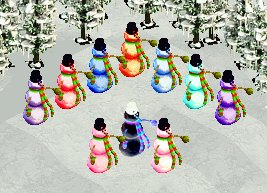
Author: Fern
Keywords: winter, snowman
Release date: 10 December 2020
Current ztd dates:
- AquaTintSnowmand_fn.ztd: December 10, 2020
- BlueSnowman_fn.ztd: December 10, 2020
- BlueTintSnowman_fn.ztd: December 10, 2020
- PinkSnowman_fn.ztd: December 11, 2020
- PinkTintSnowman_fn.ztd: December 11, 2020
- PurpleSnowman_fn.ztd: February 12, 2009
- PurpleTintSnowman_fn.ztd: February 12, 2009
- RedSnowman_fn.ztd: December 9, 2020
- SootyHalloweenSnowman_fn.ztd: December 9, 2020
- SunsetSnowman_fn.ztd: December 9, 2020
File Size: 137 kb
Compatibility: All Game Versions
Description: A few snowmen I recoloured some time ago and have finally put together.
Download Coloured Snowmen
Author: Fern
Keywords: winter, snowman
Release date: 10 December 2020
Current ztd dates:
- AquaTintSnowmand_fn.ztd: December 10, 2020
- BlueSnowman_fn.ztd: December 10, 2020
- BlueTintSnowman_fn.ztd: December 10, 2020
- PinkSnowman_fn.ztd: December 11, 2020
- PinkTintSnowman_fn.ztd: December 11, 2020
- PurpleSnowman_fn.ztd: February 12, 2009
- PurpleTintSnowman_fn.ztd: February 12, 2009
- RedSnowman_fn.ztd: December 9, 2020
- SootyHalloweenSnowman_fn.ztd: December 9, 2020
- SunsetSnowman_fn.ztd: December 9, 2020
File Size: 137 kb
Compatibility: All Game Versions
Description: A few snowmen I recoloured some time ago and have finally put together.
Download Coloured Snowmen
#79
Buildings and Shelters and Toys / Fun House
Last post by fern - October 26, 2020, 03:59:21 AMFun House

Author: Toodlepops
Graphics by Toodlepops, configuring etc by Jay
Keywords: attraction, fun fairs, theme parks
Release date: 26 October 2020
Current ztd date: October 6, 2016
File Size: 433 kb
Compatibility: All Game Versions
Description: Here is a Fun House by toodlepops, which is an attraction for a fee. It uses messages that already exist in LANG--ZKL.dll and langZA01.dll. So either or both of those ".dll" files can be used. The sound used in the Fun House is a snippet of Disney's original Electrical Parade, which is played when the building is used by guests. The Fun House is slightly animated when the building is used by guests. There is a light that goes around the center of the building and the clown's nose at the entrance will change. But the type of change will depend on the Video Quality setting in your ZT. If that setting is set to High, then the clown's nose will blink. When that setting is set to Low, ZT only shows every other frame in an animation. So with the Low setting, the clown's nose will be yellow instead of blinking and the light going around the building will jump a larger distance. The back of the Fun House has an emergency exit, which will not be used.
A note for any developer that might want to look at the used graphics for this. I used a similar technique that is used by in-game animated buildings, where the frames only have the parts that change. That made the ".ztd" one-fourth the size it would have been otherwise. So if you look at the used graphics in Zoot, you will only see the changing parts and you will not see the non-changing parts. Also, I used a ".ucb" file for the configuration. So this cannot be loaded in APE or APExp because those only look for ".ucs", ".ai", and ".uca" files.
Download
Author: Toodlepops
Graphics by Toodlepops, configuring etc by Jay
Keywords: attraction, fun fairs, theme parks
Release date: 26 October 2020
Current ztd date: October 6, 2016
File Size: 433 kb
Compatibility: All Game Versions
Description: Here is a Fun House by toodlepops, which is an attraction for a fee. It uses messages that already exist in LANG--ZKL.dll and langZA01.dll. So either or both of those ".dll" files can be used. The sound used in the Fun House is a snippet of Disney's original Electrical Parade, which is played when the building is used by guests. The Fun House is slightly animated when the building is used by guests. There is a light that goes around the center of the building and the clown's nose at the entrance will change. But the type of change will depend on the Video Quality setting in your ZT. If that setting is set to High, then the clown's nose will blink. When that setting is set to Low, ZT only shows every other frame in an animation. So with the Low setting, the clown's nose will be yellow instead of blinking and the light going around the building will jump a larger distance. The back of the Fun House has an emergency exit, which will not be used.
A note for any developer that might want to look at the used graphics for this. I used a similar technique that is used by in-game animated buildings, where the frames only have the parts that change. That made the ".ztd" one-fourth the size it would have been otherwise. So if you look at the used graphics in Zoot, you will only see the changing parts and you will not see the non-changing parts. Also, I used a ".ucb" file for the configuration. So this cannot be loaded in APE or APExp because those only look for ".ucs", ".ai", and ".uca" files.
Download
#80
Important Information / Exhibit fences 1 tile away fro...
Last post by Jay - July 12, 2020, 10:20:48 PMIf an exhibit fence is 1 tile away from the edge of a map, MM and CC will eventually crash. Most exhibit fences are configured to deteriorate and break. When these exhibit fences deteriorate or break, MM and CC will add the task of fixing them to its internal work queue. When a maintenance worker becomes available, MM and CC try to figure out a way to get the maintenance worker to the next task to do. If that next task is to fix a fence and if that fence is 1 tile away from the edge of a map, MM and CC will crash. So exhibit fences should never be 1 tile away from the edge of a map. I did not test in DD or the orginal ZT to see if those also crash.
The image shows examples of exhibit fence placement. Position A is 1 tile away from the edge of the map. So that position should not be used, since it will eventually cause MM and CC to crash. Positions B, C, and D are okay to use because they are more than 1 tile away from the edge of the map. Note that the zoo wall positions do not matter relating to this type of crash. Positions A and D are against zoo walls, but position A will eventually cause a crash while position D will not. Exhibits can be built so that the existing zoo walls are used to enclose the exhibit. So the exhibit fences in positions A and D are not needed because zoo walls 1 and 3 would be used to enclose the exhibit. Although zoo walls 1 and 2 are 1 tile away from the edge of the map, they will not cause a crash because zoo walls do not deteriorate or break, while exhibit fences in the same positions such as position A will eventually cause a crash.
If you have a zoo where there are deteriorated or broken fences 1 tile away from the edge of a map, you might be able to delete them before ZT attempts to assign a maintenance worker to fix one. Load the zoo, immediately pause ZT, delete all exhibit fences that are 1 tile away from the edge of a map, save the zoo, and load the zoo again. It is important to save the zoo and load it again because just deleting a deteriorated or broken fence does not remove fixing it from ZT's work queue. Sometimes it is difficult to pause ZT immediately, since there is sometimes a delay between clicking the pause button and ZT actually pausing. So you might need to make multiple attempts at loading the zoo and immediately pausing ZT.
For mapmakers, the above mentioned crash might influence where you put zoo walls. In the image, zoo wall 4 is at the edge of the map. That should never be done because MM and CC will crash when attempting to delete that zoo wall as part of editing the map. The original ZT did not have that problem. There are two types of positions of zoo walls that are 1 tile away from the edge of the map. Zoo walls 5 and 1 are 1 tile away from the edge of the map and are on the side of the grid line closest to the edge of the map. If you use this type of position in your map, you should warn others that use the map not to put exhibit fences against the zoo walls because that will cause an eventual crash. Zoo walls 6 and 2 are also 1 tile away from the edge of the map but are on the side of the grid line furthest from the edge of the map. This type of position will not cause a crash. With this type of position, exhibit fences cannot be placed against the zoo walls. Position C shows the closest that the entire exhibit fence can be from such a zoo wall. But it is possible to have the edge of an exhibit fence touching a zoo wall, allowing the zoo wall to be part of the enclosure. That does not cause a crash. Zoo Walls 7 and 3 are 2 tiles away from the edge of the map and are on the side of the grid line closest to the edge of the map. That is the closest a zoo wall can be to the edge of the map while allowing exhibit fences to be against it safely. The positions of zoo walls 5 and 6 are also okay as long as exhibit fences are not positioned against them, with zoo wall 5 requiring care by those making zoos on the map.
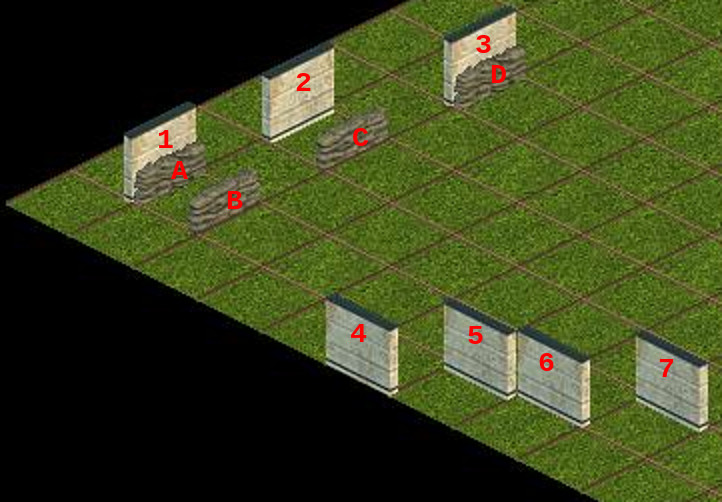
The image shows examples of exhibit fence placement. Position A is 1 tile away from the edge of the map. So that position should not be used, since it will eventually cause MM and CC to crash. Positions B, C, and D are okay to use because they are more than 1 tile away from the edge of the map. Note that the zoo wall positions do not matter relating to this type of crash. Positions A and D are against zoo walls, but position A will eventually cause a crash while position D will not. Exhibits can be built so that the existing zoo walls are used to enclose the exhibit. So the exhibit fences in positions A and D are not needed because zoo walls 1 and 3 would be used to enclose the exhibit. Although zoo walls 1 and 2 are 1 tile away from the edge of the map, they will not cause a crash because zoo walls do not deteriorate or break, while exhibit fences in the same positions such as position A will eventually cause a crash.
If you have a zoo where there are deteriorated or broken fences 1 tile away from the edge of a map, you might be able to delete them before ZT attempts to assign a maintenance worker to fix one. Load the zoo, immediately pause ZT, delete all exhibit fences that are 1 tile away from the edge of a map, save the zoo, and load the zoo again. It is important to save the zoo and load it again because just deleting a deteriorated or broken fence does not remove fixing it from ZT's work queue. Sometimes it is difficult to pause ZT immediately, since there is sometimes a delay between clicking the pause button and ZT actually pausing. So you might need to make multiple attempts at loading the zoo and immediately pausing ZT.
For mapmakers, the above mentioned crash might influence where you put zoo walls. In the image, zoo wall 4 is at the edge of the map. That should never be done because MM and CC will crash when attempting to delete that zoo wall as part of editing the map. The original ZT did not have that problem. There are two types of positions of zoo walls that are 1 tile away from the edge of the map. Zoo walls 5 and 1 are 1 tile away from the edge of the map and are on the side of the grid line closest to the edge of the map. If you use this type of position in your map, you should warn others that use the map not to put exhibit fences against the zoo walls because that will cause an eventual crash. Zoo walls 6 and 2 are also 1 tile away from the edge of the map but are on the side of the grid line furthest from the edge of the map. This type of position will not cause a crash. With this type of position, exhibit fences cannot be placed against the zoo walls. Position C shows the closest that the entire exhibit fence can be from such a zoo wall. But it is possible to have the edge of an exhibit fence touching a zoo wall, allowing the zoo wall to be part of the enclosure. That does not cause a crash. Zoo Walls 7 and 3 are 2 tiles away from the edge of the map and are on the side of the grid line closest to the edge of the map. That is the closest a zoo wall can be to the edge of the map while allowing exhibit fences to be against it safely. The positions of zoo walls 5 and 6 are also okay as long as exhibit fences are not positioned against them, with zoo wall 5 requiring care by those making zoos on the map.